
FAQs
Monday – Friday: 9 AM – 5 PM PT
Saturday: 10 AM – 3 PM PT
Sunday: Closed
Schedule a call or Zoom meeting with a Member Advisor.
If you're a member, contact us through Digital Banking.
And here's a great place to start.
- About Us
- Alumni Credit Card
- ATM & Branches
- ATM & Branches - Individual
- Business Accounts
- Business Checking
- Business Credit Cards
- Business Loans
- Business Rates
- Business Savings
- Card Center
- Certificates
- Checking & Savings
- Checking & Spending
- Contact Us
- Commercial Real Estate Loans
- Compare Credit Cards
- Companion Account
- Credit Cards
- Custom Rates
- Debit Cards
- Deposit Rates
- Digital Banking
- Enterprise Partnership
- Everyday Spending
- Health Savings Account
- High Yield Spending
- Home Equity Loans
- Individual Retirement Account
- Kid & Teen Banking
- Loans
- Loyalty+
- Manage Accounts
- Manage Cards
- Market-Leading Rates
- Membership
- Membership + Benefits
- Money Market Account
- Money Transfers with Zelle
- Mortgage Education
- Mortgage Rates
- Mortgage Team
- Mortgages
- Move Money
- New Member Offer
- Partner Companies
- Payments
- Personal Loans
- Purchase Loans
- Refinance Loans
- Savings Accounts
- Savings
- Service Fees
- Share Account
- Stanford Athletics Card
- Statements
- Strong Safe Secure
- Student Cash Rewards Card
- Student Favorites
- Student Spending
- Tech Card
- Transfers
- Vehicle Loans
- Virtual Branch
- Why Stanford FCU
- Wire Transfers
- Zelle
About Us
Stanford FCU is a great place to work, and we’re always looking for talented individuals to join our team!
Visit our Careers Page to learn more and browse our job openings.
Visit our About Us page to learn more about who we are and what we do.
Mailing Address:
Stanford Federal Credit Union
PO Box 10690
Palo Alto, CA 94303-0843
For a list of all branch locations and their respective mailing addresses, please see our ATM and Branch Locator.
Please refer to our Contact Us page for all the ways you can contact us, including mailing addresses, phone numbers and department fax numbers.
Visit our Branch and ATM Locator to find Stanford FCU branches and ATMs, or to locate one of our 30,000 fee-free ATMs.
If you believe your card has been lost or stolen, please contact a Member Care Team Specialist immediately at 888.723.7328 to protect your accounts.
Yes, we’re proud of our financial strength! You can view our most recent Annual Report online.
Stanford FCU’s routing number is 321177722.
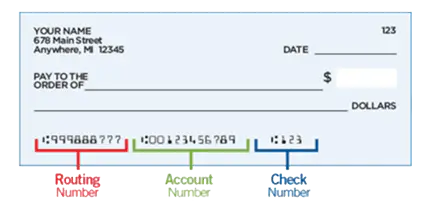
The Routing Number is also called an ABA number or routing transit number. You can find it in the lower left corner of your checks.
Financial institutions use routing numbers in order to process payments electronically. Some examples of electronic payments that Stanford FCU provides are bill pay, wire transfers, checking transactions (sometimes called electronic checks), and direct deposits.
With Digital Banking, you can access all of these electronic payment methods from your home in a safe and secure environment. Sign up today!
The branches and offices for Stanford FCU are closed on all federal holidays listed below, unless special hours are noted.
New Year’s Day: Thursday, January 1, 2026
Martin Luther King, Jr. Day: Monday, January 19, 2026
Presidents’ Day: Monday, February 16, 2026
Memorial Day: Monday, May 25, 2026
Juneteenth National Independence Day: Friday, June 19, 2026
Independence Day: Saturday, July 4, 2026
Labor Day: Monday, September 7, 2026
Columbus/Indigenous People’s Day: Monday, October 12, 2026
Veterans Day: Wednesday, November 11, 2026
Thanksgiving: Thursday – Friday, November 26-27, 2026
Christmas Eve: We are open until 2:00pm on Thursday, December 24, 2026
Christmas Day: Friday, December 25, 2026
New Year’s Eve: We are open until 2:00pm on Thursday, December 31, 2026
ATMs and Digital Banking are always open. You can also call us 24/7 at 888.723.7328.
The FDIC provides oversight and insurance for banks and thrifts, while credit unions are insured by the National Credit Union Administration (NCUA). Both institutions insure accounts up to $250,000.
You can learn more about the difference between banks and credit unions by watching our short video.
Not a member yet? Join today!
If you want a banking experience that delivers lower home and vehicle loan rates, higher savings and investment rates, and leading-edge Digital Banking access, Stanford Federal Credit Union is the banking choice for you. We’re a member-owned financial cooperative providing personal service along with convenient nationwide access through Co-op shared branches.
Joining is easy! You can open an account online with as little as $5.00. Open your account today!
A credit union and a bank are both financial institutions that provide checking and savings accounts, credit cards and other financial services, but they have some key differences in how they are run and organized.
Credit unions
- Not-for-profit
- Members have a voice!
- Board of Directors are volunteers
- Income goes back to members (that's you!)
- Low to no fees for members
- Compelling savings rates
- Federally insured by NCUA
Banks
- For profit
- Stockholders have a voice
- Board of Directors are paid by the bank
- Income goes to the stockholders (boo!)
- Higher fees
- Average savings rates
- Federally insured by FDIC
Credit unions are member-owned. That means members have an active voice in how the credit union is run and the decisions the credit union makes. In contrast, banks are owned by their shareholders. Bank customers aren’t invited to shareholder meetings (unless they are also a shareholder), but all credit union members are regularly invited to the credit union’s annual meeting.
Another key difference is what the financial institutions do with their profits. Banks are for profit and need to pay their Board of Directors and shareholders. Since the goal is to make money, they may charge higher fees and offer lower savings rates. Credit unions, on the other hand, are not-for-profit. Any extra income they make goes back to the members in the form of better savings rates, lower loan rates, and reduced or waived fees.
Both credit unions and banks carry federal insurance for their members’ and customers’ money. Banks are insured through the Federal Deposit Insurance Corporation (FDIC), and credit unions are insured through the National Credit Union Administration (NCUA). The insurance limits through both agencies are the same.
Both credit unions and banks are safe places for your money, but we believe that credit unions are something truly special. A credit union like Stanford FCU cares about you as a person (and not just an account number) and will bend over backwards to find ways to say YES to your financial success. We put our members first, and we invite you to experience the credit union difference for yourself.
ATM & Branches
For a list of shared branch locations and hours, visit our ATM and Branch Locator.
Shared branches are available through the Co-op, a cooperative effort between credit unions nationwide to assist each other’s members. As a result, you can conduct business on your Stanford FCU accounts at other credit unions throughout the country as though you were at your local Stanford FCU branch. You can also find 30,000 fee-free ATMs through our ATM and Branch Locator.
You can view our convenient hours and locations by visiting our ATM and Branch Locator.
We also participate in shared branching with Co-op, a cooperative effort between credit unions nationwide to assist each other’s members. As a result, you can conduct business on your Stanford FCU accounts at other credit unions throughout the country as though you were at your local branch!
You can find a nearby shared branch or fee-free ATM by visiting our ATM and Branch Locator.
Not a member yet? Joining is easy! You can open an account online with Stanford FCU with as little as $5.00. Open your account today!
The transactions you can complete at the shared branches vary by institution and branch, so we recommend checking their website or calling ahead after you find a convenient location.
Some examples of transactions allowed at Co-op shared branches are:
- Cash withdrawals up to $500
- Deposits to your account
- Get account information
- Make loan payments
- Transfer money to another account
- Purchase money orders, travelers checks or official checks
- And more!
For a list of shared branch locations and hours, visit our ATM and Branch Locator.
The hours of each shared branch will vary. For a list of shared branch locations and hours, visit our ATM and Branch Locator.
Shared branches are available through the Co-op, a cooperative effort between credit unions nationwide to assist each other’s members. As a result, you can conduct business on your Stanford FCU accounts at other credit unions throughout the country as though you were at your local Stanford FCU branch (some services may be limited). You can also find 30,000 fee-free ATMs through our ATM and Branch Locator.
If you’re local, visit us at a Stanford FCU branch.
You can view our convenient hours and locations by visiting our ATM and Branch Locator. ATMs and Digital Banking are always open!
Yes! We allow members of other credit unions to come into our branches to conduct transactions.
The following transactions are allowed at a Co-op shared branch:
- Cash withdrawals up to $500
- Deposits to your account
- Obtain account information
- Make loan payments
- Transfer money to another account
- Get cashier’s checks
- And more!
Be sure to bring a photo ID. For a complete list of participating shared branches please visit our ATM and Branch Locator.
Not a member yet? Join today!
If you want a banking experience that delivers lower home and vehicle loan rates, higher savings and investment rates, and leading-edge Digital Banking access, Stanford Federal Credit Union is the banking choice for you. We’re a member-owned financial cooperative providing personal service along with convenient nationwide access through Co-op shared branches.
Joining is easy! You can open an account online with as little as $5.00. Open your account today!
We participate in shared branching with Co-op, a cooperative effort between credit unions nationwide to assist each other’s members. As a result, you can conduct business on your Stanford FCU accounts at other credit unions throughout the country as though you were at your local branch (with some service restrictions).
You can find a nearby shared branch or fee-free ATM by visiting our ATM and Branch Locator.
Not a member yet? Joining is easy! You can open an account with Stanford FCU with as little as $5.00. Open your account today!
You can find a Stanford FCU ATM, and 30,000 more fee-free ATMs by visiting our ATM and Branch Locator.
If you have a debit card, you can also receive cash back at no charge when you make a purchase at a retail location.
For your convenience, we also participate in shared branching with Co-op, a cooperative effort between credit unions nationwide to assist each other’s members. As a result, you can conduct business on your Stanford FCU accounts at other credit unions throughout the country as though you were at your local branch.
For a list of shared branch locations, visit our ATM and Branch Locator.
In addition to STAR® and Plus, we also use Co-op, with over 30,000 fee-free ATMs nationwide. You can get cash back when you make a purchase at many retailers like grocery stores.
We also participate in shared branching with Co-op, a cooperative effort between credit unions nationwide to assist each other’s members. As a result, you can conduct business on your Stanford FCU accounts at other credit unions throughout the country as though you were at your local branch (some service limitations may apply).
For a list of shared branch locations, visit our ATM and Branch Locator.
Checking & Spending
You can open a savings or checking account at the same time you become a member. Once you become a member, you can open additional accounts and apply for loans through Digital Banking. You can also open accounts at any Stanford FCU branch.
If you don’t have enough money in your account to cover a check, debit card purchase, recurring debit card or ACH transaction, your financial institution can either reject the transaction or cover it for you. When they cover or protect you from overdrawn accounts, it’s called “overdraft protection”. This can sometimes be embarrassing and expensive because most financial institutions charge a fee. In the case of a bounced check, the check recipient may also charge a fee.
There are three ways to manage transactions when there are insufficient funds:
- Reject the transaction - The financial institution can simply decline the transaction or send back a check you wrote. Note that the check or ACH can be re-submitted, and it will only process when you have enough money in your account. Many financial institutions charge a non-sufficient funds (NSF) fee for rejected items, but Stanford FCU does not.
- Account-to-account transfer - You can link your other accounts at the same financial institution to automatically transfer money into your account to cover a transaction when there isn’t enough money. At Stanford FCU you can set up your savings, money market or credit card to cover checks and ACH items. Most banks charge for these automatic account-to-account transfers (and for cash advance fees if you link to a credit card), but Stanford FCU does not, and never has.
- Courtesy Pay - You can opt into allowing your financial institution to cover transactions when you don’t have enough money, and they will charge a fee for each transaction. At Stanford FCU, Courtesy Pay will cover check, debit card, and ACH transactions. Courtesy Pay is free for transactions under $10, and will cover up to four transactions per day with a Premium OD/Courtesy Pay fee. Our fees are listed on our Schedule of Fees(link to Service Fees page).
Avoid rejected transactions with overdraft protection! Call 888.723.7328 or use Chat to set up account-to-account transfers and opt into Courtesy Pay to protect yourself if your account goes negative.
Your account balance is the total amount of money that is currently in your account, including any pending transactions (e.g., debit card purchases that have not cleared).
Your available balance is the total amount of money in your account that you can use for purchases and withdrawals, as it excludes pending transactions and check holds from your account balance. However, the available balance will not show checks that haven’t been cashed or deposits which haven’t posted.
You should always use the available balance to determine how much money you have available for purchases and withdrawals. Otherwise you might overdraw your account if you spend based on your account balance and it is higher than your available balance.
There are options available to protect you from an overdrawn account. Learn more about our overdraft protection options.
Stanford FCU is proud to be a part of the Bank On coalition with our free Everyday Spending account.
Bank On is a national platform for the 501(c)3 corporation Cities for Financial Empowerment (CFE) Fund. Bank On supports financial institutions in providing safe and affordable bank or credit union accounts for everyone.
According to Bank On, nearly 4.5% of U.S. households don’t have a checking or savings account. That’s approximately 5.9 million U.S. adults! Reasons for not having a basic account could include a lack of trust in financial institutions, higher fees, not enough money for the minimum balance, or problems with identification or credit history.
Without a bank or credit union account, many “unbanked” Americans turn to alternative financial services, such as check cashers or pawn shops, often paying exorbitant fees in the process. By choosing not to put money into a stable financial institution with minimal fees, “unbanked” individuals have a harder time building wealth and economic stability. They’re also more likely to be victims of crime, since many keep significant amounts of cash on hand.
In order to prevent this, the CFE Fund and Bank On work with financial institutions to promote and encourage the availability of more low cost or free accounts.
In order to be part of the Bank On coalition, financial institutions must adhere to a set of National Account Standards. These standards are basic requirements to ensure consumers have access to safe and affordable accounts.
There is no specific time, but your direct deposit will be posted to your account before 8:00 AM PT on your pay date, and we post the funds as soon as we receive the file from your employer (up to two days before payday!).
You can check your direct deposit and available balance easily through Digital Banking!
If you previously ordered checks through Stanford FCU and your information has not changed, you may reorder checks through Digital Banking by clicking here.
If any of your information has changed, you will need to contact us to place your order: Visit any of our branch locations, call a Member Advisor at 888.723.7328, or send a secure Message through Digital Banking.
Although you can order checks from any vendor, we strongly recommend that you order them through Stanford FCU’s preferred vendor. This helps ensure quality and security to ensure there are no issues with your checks. And the first box of checks is free for new members!
If you previously ordered checks through Stanford FCU and your information has not changed, you may reorder checks in Digital Banking.
You can also visit any of our branch locations or call a Member Care Team Specialist at 650.723.2509 or 888.723.7328 toll free.
Although this is the least secure and slowest way to make a deposit, you can mail a check for deposit to:
Stanford FCU
P.O. Box 10690
Palo Alto, CA 94303-0843
You can also stop by one of our branches, use a shared branch or deposit-taking ATM, or make a deposit with our Digital Banking.
Follow these steps to deposit a check through our Digital Banking:
- Endorse your check by signing the back
- Log into our Digital Banking, and go to Move Money or choose Deposit in the mobile app
- Select the account to deposit into
- Enter the check amount
- Place your check on a plain, dark surface and capture the front, then back
- Submit your deposit
- Follow any additional prompts
Retain the check for 90 days before destroying.
Note: There is a maximum check amount of $50,000.
All of our personal checking (spending) accounts are free, with no minimum balance or other requirements. For up-to-date information on our spending account requirements, visit our Personal Checking Account page.
Our Business Spending account does require a minimum balance to avoid a monthly service fee. For more information on Business Spending, visit our Business Checking account page.
You’ll also find that our account fees(link to Service Fees page) are considerably fewer and lower than the big banks!
Check holds vary based on the length of membership and the check amount. Click here to request a Check Hold Release through Digital Banking.
It’s easy to add or switch your direct deposit to Stanford FCU through your employer or the Social Security Administration. You can also use our Non-Federal Direct Deposit Enrollment Request Form to assist your employer if needed. You’ll need the following information:
- Stanford FCU’s routing number: 321177722
- Your account number (log in to Digital Banking, click on the three dots at the bottom of the account tile on the home page, and choose Account Details)
- Our address: Stanford Federal Credit Union, P.O. Box 10690, Palo Alto, CA 94303-0843
- Our phone number: 650.723.2509
Once your company receives the information or form, the direct deposit switches typically take 1-2 pay cycles.
There are several ways to sign up for direct deposit:
- You can sign up for direct deposit through your employer or through the government agency that issues your checks.
- You can use our Non-Federal Direct Deposit Enrollment Request Form to assist your employer if needed.
- You can also fill out a form provided by your employer or the government agency. You’ll need the following information:
- Stanford FCU’s routing number: 321177722
- Your account number (log in to Digital Banking, click on the three dots at the bottom of the account tile on the home page, and choose Account Details)
- Our address: Stanford Federal Credit Union, P.O. Box 10690, Palo Alto, CA 94303-0843
- Our phone number: 650.723.2509
Note: Your member number is not your account number. Each savings or checking account has a separate, unique account number. You can also find your account number on your checks:

However you sign up for direct deposit, you’ll get your money up to two days before payday, because we always post payroll as soon as we receive your direct deposit!
Credit & Debit Cards
There are three ways to activate your debit or credit card. Do not activate your plastic card before it arrives! Mail theft could put your account at risk.
- Activate your card online:
- Visit Card Center in Digital Banking
- Click on Digital Card Controls at the very top
- Enter the secure access code that will be sent to confirm your identity
- Click on Activate Card
- Select the card from the dropdown
- Enter the expiration date and CVV on your card
- Click Submit
- Activate your card by calling 888.691.8661 from the phone number we have on file for you and follow the prompts (you can verify or update your phone number in the Profile & Settings section of Digital Banking).
- Activate your card at an ATM or by making a point of sale (POS) purchase - use this method only if you have your PIN.
Once activated, you can manage your cards with convenient online Card Tools like text alerts, locking and unlocking your card, notifying us when you’ll be traveling, and more. You’ll be automatically enrolled to receive fraud alerts.
Yes, you can authorize other users such as family members to use your Stanford FCU credit card, however please note that you will be responsible for all of their charges. You can easily add up to four authorized users through Digital Banking. This will result in new cards with the same card number and new expiration dates and CVV numbers being mailed to your primary address on record.
- Log in to Digital Banking’s Card Center to Add Authorized User
- Choose your credit card from the drop-down menu
- Complete the form (you’ll need the name, birth date and social security number for each authorized user)
- You’ll receive a confirmation email when complete, and the cards will take 5 to 7 days for delivery
- If you don’t have the social security number for your user you can call us at 888.723.7328 to add them.
Note that the card activity for all users will be reported to the credit bureaus, which could help a family member build credit.
If you don’t qualify for another Stanford FCU credit card, you may be offered the Cash Rewards credit card.
The Cash Rewards credit card earns 1% cashback on all purchases. Cashback is credited to your account each month. There are no annual fees, and no cash advance or balance transfer fees. There are no foreign transaction fees on purchases in other countries.
The Cash Rewards credit card has the following features:
- Online management tools in Card Center, like text alerts and locking/unlocking your card
- Tap and pay
- Mobile wallet compatibility
- Instant digital card for online purchases and subscriptions
The Cash Rewards credit card also comes with the following benefits:
If you don’t qualify for another Stanford FCU credit card, you may be offered the Secured Credit Card.
The Secured Credit Card is a way to build or rebuild good credit. The Secured Credit Card uses your savings account as collateral, and it works just like any other credit card. There are no annual fees, and no cash advance or balance transfer fees. There are no foreign transaction fees on purchases in other countries.
The Secured Credit Card comes with the following features:
- Online management tools in Card Center, like text alerts and locking/unlocking your card
- Tap and pay
- Mobile wallet compatibility
- Instant digital card for online purchases and subscriptions
- Credit limits from $500 to $1,000
- Backed by your savings account at 110% of the credit limit
The Secured Credit Card also comes with the following benefits:
Do I need to be a member of the credit union to get a Rewards Credit Card?
Yes, you must become a member before you can use any products or services. When you apply for your credit card, you can become a member at the same time by opening a checking (spending) or savings account with a minimum deposit of $5.00. Stanford FCU will put the $5.00 requirement into the savings account on your behalf. It represents your ownership share, allowing you to fully participate and vote at our annual membership meeting. Membership eligibility is required, and you must have a U.S. address.
Who can get the Stanford Alumni or Athletics® Fan Rewards Visa® Credit Card?
The Stanford Athletics® Fan Rewards Card is available to all Stanford fans! The Stanford Alumni Rewards Visa Credit Card is only available to Stanford alums, although sports fan alums may prefer the Stanford Athletics Fan Card - both cards support the Stanford Alumni Association and have the same features and benefits.
In addition to the rewards points, what other benefits do I get with a Stanford Alumni or Athletics® Fan Rewards Visa® Credit Card?
- No annual fee
- No foreign transaction fees
- No balance transfer or cash advance fees
- Manage your card with convenient online tools like text alerts, locking and unlocking your card, notifying us when you’ll be traveling, and more
- Emergency Card Replacement and Emergency Cash Delivery
- Travel and Emergency Assistance Services
- Roadside Dispatch
- Concierge Services
Learn more about all the extra benefits available with your credit card!
How long does it take to receive the Card?
You should receive your new credit card within 10 business days after you’re approved. If you do not receive it within 10 days, please contact Stanford FCU at 888.723.7328. If you are an alumni, please call 888.371.8584.
What is the bonus point value?
Earn one (1) point for every $1 spent (more if it’s 2X or 3X points). Each point is worth $.01, so 2,500 points have a $25 value. The bonus points can be redeemed for cash, gift cards, merchandise, hotels and airfare. You can redeem your points through Digital Banking. The maximum points earned per calendar year are 12,000 points for the 3X category and 6,000 points for the 2X category. The 1X category has no point maximum.
What are the rates and fees associated with the Rewards Credit Card?
Please visit our Rates and Fees page.
Does the Stanford Alumni Association or Stanford Athletics® receive compensation from Stanford FCU?
Yes. Both the Stanford Alumni Association and Stanford Athletics® have sponsorship and licensing agreements with Stanford Federal Credit Union. These programs assist in supporting activities and services for the Athletics Department, alums and students.
All of our credit card options have no annual fee, no balance transfer fees, no cash advance fees, and no foreign transaction fees! Most options earn rewards points with every purchase. Visit our Credit Cards web page to view our different card options, and visit our Card Benefits web page to explore the additional benefits available for each card.
An ATM card can only be used at an ATM terminal to withdraw or deposit money, or at certain merchants who accept ATM transactions. A debit card can be used at ATMs as well, but can also be used to make purchases online, in stores, and at restaurants just like a credit card. However, these purchases are deducted immediately from your checking account.
A free debit card is provided when you open a checking (spending) account with Stanford FCU. Check out our spending account options to determine which account is right for you. The first box of checks is free!
Not a member yet? Joining is easy! You can open an account with Stanford FCU with as little as $5.00. Open your account online today!
Stanford FCU credit and debit cards have NO foreign transaction fees - this is great for international travelers!
Plus, you earn cash back or rewards points on all credit card purchases.
Traveling Abroad?
We offer a foreign currency exchange service, which makes it safe and easy to purchase foreign currencies at a branch.
To set a Travel Notification on your card: Submit a travel notice in Digital Banking and list all areas you may be visiting, including layover cities. Once submitted, you should receive a secure message that it has been received.
Please allow at least one business day for processing. The more advance notice you can provide, the better. If you already started your trip, please call 888.723.7328 for assistance.
Note: We do not allow card transactions in countries sanctioned by the U.S. or prohibited by U.S. law.
Exchange rates are calculated in global currency markets. The reasons for fluctuations in exchange rates include inflation, interest rates, budget deficits, public debt, trade policy, political stability, and economic performance.
If you are traveling out of state or out of the country, be sure to set a Travel Notice so we don’t block your credit or debit card.
To set a Travel Notice on your card:
- Log in to Digital Banking
- Click Services > Submit Travel Notice, then follow the prompts (list all areas you may be visiting, including layover cities)
- Once the Travel Notice is submitted, you will receive a secure Message that it has been received
Please allow at least one business day for processing. The more advance notice you can provide, the better. If you already started your trip, please call 888.723.7328 for assistance.
We do not allow card transactions in countries sanctioned by the U.S. or prohibited by U.S. law.
There could be many reasons why this is happening. Please call a Member Care Team Specialist at 888.723.7328 toll free. You can also use Chat during business hours to resolve the issue.
If you’re traveling out of state or out of the country, be sure to set a Travel Notice so we don’t block your credit or debit card. List all areas you may be visiting, including layover cities. Once submitted, you should receive a secure message that it has been received.
We do not allow card transactions in countries sanctioned by the U.S. or prohibited by U.S. law.
A Digital Card is a copy of your regular credit or debit card that’s available in Digital Banking’s Card Center. No more waiting weeks for a plastic card to arrive by mail - your card number, expiration date and CVV are available for your online shopping, subscription services, and loading into your mobile wallet.
Whether you’re waiting for your first card or a replacement card, your Digital Card is available within two days:
- Visit Card Center in Digital Banking
- Click on Digital Card Controls at the very top
- Enter the secure access code that will be sent to confirm your identity
Activating your plastic card
Your regular plastic card will be mailed to your primary address and there are three easy ways to activate it. Do not activate your plastic card before it arrives! Mail theft could put your account at risk.
- Activate your card online:
- Visit Card Center in Digital Banking
- Click on Digital Card Controls at the very top
- Enter the secure access code that will be sent to confirm your identity
- Click on Activate Card
- Select the card from the dropdown
- Enter the expiration date and CVV on your card
- Click Submit
- Visit Card Center in Digital Banking
- Activate your card by calling 888.691.8661 from the phone number we have on file for you and follow the prompts (you can verify or update your phone number in the Profile & Settings section of Digital Banking).
- Activate your card at an ATM or by making a point of sale (POS) purchase - use this method only if you have your PIN.
The Travel Accident Insurance benefit is available with our Platinum Cash Back and Business Credit Cards. If you have additional questions, please contact the Plan Administrator listed in the benefit coverage document.
Apply for your Credit Card today! Learn more about our low-rate credit cards with rewards and virtually no fees! Our online credit card application process is secure, quick and simple. Current members can apply through Digital Banking or the mobile app. Non-members must first apply for membership online in as little as 10 minutes.
Get started by reviewing our credit card options to find the right card for whatever you need:
All Stanford FCU credit cards have no annual fees, no foreign transaction fees, no balance transfer or cash advance fees - we put our members first! Most of our credit cards also earn cash-back and other rewards.
Our online application process is secure, quick and simple. Current members can apply through Digital Banking. Non-members must first apply for membership online in as little as 10 minutes.
Get started by reviewing our credit card options to find the right card for whatever you need:
Our online application process is secure, quick and simple. Current members can apply through Digital Banking. Non-members must first apply for membership online in as little as 10 minutes.
Our Business Rewards credit card has a low rate, virtually no fees, and you’ll earn one point for every dollar spent (two points for restaurants and food delivery like DoorDash). Your cashback will be credited to your account monthly. Click here to learn more or contact us at [email protected].
Tap to Add Card is a quick and secure way to add your debit or credit card to your Apple Wallet. Just tap your card to your phone—no typing or photos needed. Here’s how it works:
- Open your Apple Wallet and tap the + button
- Tap Debit or Credit Card
- Tap Continue
- Place the card on the back of the iPhone
- Agree to the Terms and Conditions
- Verify your card for Apple Pay
- Receive confirmation when the card is added and ready to use
Available only for Apple iOS 18 or later.
Digital Banking
The following types of checks are accepted with mobile check deposit:
- Personal checks
- Business checks
- Government/Treasury checks
- Cashier’s checks
Note: The check must be from a United States financial institution and in United States currency.
You can automatically generate a verification of deposit letter in Digital Banking! Click here.
Depositing checks with your smartphone or tablet is easy with Stanford FCU’s convenient mobile app!
Follow these steps to deposit a check:
- Endorse your check by signing the back
- Log in to Digital Banking, and select Deposit from the quick links at the bottom
- Select the account to deposit into
- Enter the check amount
- Place your check on a plain, dark surface and capture the front, then back
- Submit your deposit
- Follow any additional prompts
- Retain the check for 90 days before destroying.
Note: There is a maximum check amount of $50,000.
Mobile deposits are subject to verification, and funds may not be available immediately. Once the deposit has been received, you’ll be able to view the pending transaction through Digital Banking. In most cases, checks will be deposited the same day.
You can also request a Check Hold Release through Digital Banking. Click here.
Ready to make a mobile deposit? It’s easy!
Follow these steps to deposit a check:
- Endorse your check by signing the back
- Log in to the mobile app and select Deposit from the very bottom
- Select the account to deposit into
- Enter the check amount
- Place your check on a plain, dark surface and capture the front, then back
- Submit your deposit
- Follow any additional prompts
Retain the check for 90 days before destroying.
Please note: There is a maximum check amount of $50,000.
Stanford FCU is taking your Digital Banking security to the next level with our Secure Access Code (SAC). A SAC is a 6-digit numeric systematic code. The SAC will be sent to a phone number that we have on file for you (text or call), so if a fraudster is attempting to access your accounts, we will be able to prevent access. A SAC is required the first time you log in to Digital Banking with a new device, and may be sent with other high-risk transactions like wire transfers and password changes.
DO NOT share a SAC with anyone. Fraudsters may pretend to be a Stanford FCU employee calling to warn you about an urgent problem with your account. We will never call you and ask for a SAC, PIN or password.
If your code expires, you can request another SAC. If you have any issues, please call us at 888.723.7328.
If you enter incorrect login information several times in a row, your account will be locked for security reasons. You can use the Unlock link located right below the login box, then use the Forgot Password link located next to it.
You will then choose a verification method for us to send you a Secure Access Code. Once you enter the Secure Access Code, you’ll be able to change your password. This ensures that a fraudulent person is not trying to gain access to your accounts. Do not share the Secure Access Code with anyone!
You can change your passwords any time within Digital Banking or the mobile app.
You can also set up your login with a fingerprint or face ID, so you don’t need to worry about remembering a password!
Yes! We offer a wide range of different real-time alerts that you can add or remove to any of your deposit or loan accounts! Through our Digital Banking, you can manage and control your account alerts.
You can choose from many options with a one-time enrollment, and opt into receiving your alerts via email and/or SMS text. Note that adding, changing or deleting email addresses and phone numbers in Account Alerts will only impact the alerts. If you need to update the information we have on file for you, please go to Profile & Settings to Update Contact Information.
You can also manage your credit and debit cards with convenient online Card Tools like text alerts, locking and unlocking your card, notifying us when you’ll be traveling, and more. You’ll be automatically enrolled to receive fraud alerts.
If you forget your password, you can reset it yourself by clicking on the Forgot Password link just below the login box.
Then choose a verification method for us to send you a Secure Access Code. Once you enter the Secure Access Code, you’ll be able to change your password. This ensures that a fraudulent person is not trying to gain access to your accounts. Do not share the Secure Access Code with anyone!
You can change your passwords any time within Digital Banking.
Note: After several failed login attempts, your account will be locked for security reasons. If you do not remember your password after the first or second attempt, it’s best to use the “Forgot Password” option and follow the prompts to reset your password.
If you are locked out of Digital Banking, you can use the Unlock link located right below the login box.
You can use your same Digital Banking credentials or enroll directly on the mobile app using the Enroll link at the bottom.
If you forgot your password, open the mobile app and click the Forgot your password? link. You’ll be prompted to enter your Login ID. Then you’ll choose a verification method so a Secure Access Code can be sent to you. Once you enter the Secure Access Code, you’ll be able to change your password.
If you need further assistance, please contact us at 650.723.2509 (local) or 888.723.7328 toll free.
You can update your Secure Access Code (SAC) Delivery in Digital Banking under Profile & Settings > Manage login credentials.
Remember to never share your SAC with anyone, not even a Stanford FCU representative. The only time we’ll ask for a SAC is if you call us and we need to verify your identity by sending a SAC for verification.
Your CashBack+ digital gift cards are available in your CashBack+ wallet within Digital Banking, and they never expire! You’ll also receive an email confirmation with instructions and a PIN to redeem your gift card yourself or forward to a friend.
You can also follow these steps to view and redeem your gift cards and balances. Once you start using a gift card, you’ll need to check with the merchant on the remaining balance. Visit CashBack+ in Digital Banking, then select the Wallet icon at the top to see your gift cards. For online purchases, enter the Gift Card Code. For in-store purchases, use the QR code.
You can find your cashback balance at the top of the CashBack+ homepage. When you’re ready to use it, transfer it to your Stanford FCU spending or savings account, or redeem it for another gift card to stack even more cashback.
Questions? Please email CashBack+ directly at [email protected].
Our mobile check deposit service leads the industry with its patented agile risk management tools and proprietary image technologies to ensure your transaction is secure. For added protection, the images of your checks are not stored on your mobile device. Mobile deposit is much safer than mailing a check, and faster than driving to a branch or ATM to deposit it.
There are two ways to change your contact information:
- Through the Update Contact Information service in Digital Banking (or watch video)
- In Person – Make an appointment at a local branch to update your information. Please bring a photo ID such as a Driver’s License for identification.
If you need to change your name, please contact us by calling 888.723.7328, use Chat during business hours, or send a secure Message in Digital Banking so we can provide you with the appropriate forms and advise you on the documentation needed to protect your accounts.
Find your Loyalty+ rewards status on the main landing page in Digital Banking. Click on the tile to view complete information about your status.
The more accounts and services you use, the more benefits you receive!
At Stanford FCU, we want to help you make the most of your banking experience. That’s what Loyalty+ is all about. You get more value when you do more with us!
You’ll enjoy exclusive benefits like bonus deposit rates, loan discount rates, and reimbursed ATMs fees worldwide.
Learn more on our Loyalty+ web page, and view your Loyalty+ status in Digital Banking.
Round Up is an easy way to make every debit card purchase work a little harder for you. When you use your debit card, your purchase is rounded up to the nearest dollar, and the spare change is put toward what matters most to you.
In Digital Banking, you decide where those Round Up amounts go. You can:
- add them to your savings to grow your balance automatically
- donate them to verified non-profits you care about
- or split them between saving and giving
You’re always in control. You can set, change, or pause your Round Up preferences anytime in Digital Banking. It’s a simple, automatic way to save more, give back, or do both - without changing how you spend.
Are Round Up donations tax deductible?
Yes. All Round Up donations are tax deductible. A donation receipt will be available in Digital Banking by the 5th business day of each month and can be easily downloaded for your tax records.
Can I choose any spending account for Round Up?
You’ll need to select a spending account that has an active debit card linked to it. Only debit card purchases from that account qualify for Round Ups.
Haven't signed up for Digital Banking yet?
You can view your account history, transfer funds between your accounts, make a loan payment, access Bill Pay and eStatements...and more! Sign up for Digital Banking today to handle all your personal banking in one convenient and secure place.
CashBack+ actions allow you to earn cashback by completing specific tasks set by your credit union. To earn cashback, activate the action and complete the required task. Once verified, the cashback will be credited to your account balance.
You can go to the Actions tab within CashBack+ to view and activate any available actions, and click on ‘View details’ on the action to learn more about how to complete the action and track your progress. You should check your actions monthly, although we may add actions more frequently. Not all members will always have available actions to complete. Don’t forget to look at the expiration date when you activate an action.
Once the actions are completed and approved, your cashback will be added to your cashback balance monthly. You may see “payout processing” which means you completed your actions and are awaiting the cashback to be added to your balance in the next payout cycle.
CashBack+ is a rewards benefit offered in Digital Banking. Earn instant cashback by completing actions and by doing your everyday shopping with digital gift cards.
It’s an experience that’s designed to reward engagement with us. Membership pays!
You can earn cashback rewards by purchasing digital gift cards to pay for your orders in-store and online. You can also earn by completing reward actions offered periodically in Digital Banking.
You can always see your cashback balance at the top of the CashBack+ homepage in Digital Banking. When you’re ready to use it, you can transfer your cashback to your Stanford FCU spending or savings account with no minimums, or redeem it for another gift card to stack even more cashback.
Cashback is earned instantly, and there are no limits on how much you can earn.
If you already have joint owners on an existing account, you can add them when you open a new account in Digital Banking. You can add a joint owner to an existing account at a local Stanford FCU branch or via Zoom at our Virtual Branch. You’ll need a copy of your joint owner’s picture ID or Passport.
Fees & Services
An insufficient funds fee (sometimes referred to as a non-sufficient funds fee or NSF fee) can occur when you don’t have enough money in your checking (spending) account to cover the entire transaction. Most financial institutions will reject the transaction and charge a fee. Stanford FCU will reject the transaction, but we won’t charge a fee.
An uncollected funds fee can occur when there are pending credits to your account (like a deposited check that has yet to clear), and you try to make a purchase for more than your available balance. Although there are funds on deposit, a transaction may be declined because the purchase would overdraw the account. Since the check has not cleared, a financial institution cannot guarantee those funds.
As a best practice, always use your available balance as a guide for writing checks, withdrawing cash and making purchases. You can monitor your available balances through Digital Banking.
There are options available to protect you from an overdrawn account. Learn more about our overdraft protection options.
There is no fee for a Cashier’s or Official Check for our members! You can request one in Digital Banking if it’s payable to you, stop by one of our branches, call us at 888.723.7328, or send a secure Message through Digital Banking to get your Cashier’s Check today!
There’s no fee for Stop Payments! For security purposes and faster service, we recommend that you complete your Stop Payment requests in Digital Banking:
- Click here to place a Stop Payment of a check or checks
- Click here to place a Stop Payment or Dispute an ACH transaction
After your request has been received and processed, you will receive confirmation through a secure Message in Digital Banking.
We do not have money orders. Members can get a Cashier’s or official check, and there is no fee. You can get a free Cashier’s Check from a local Stanford FCU branch, any shared branch in the U.S., or request one in Digital Banking if the check will be payable to you. If you need a Cashier’s Check made payable to another person, you can send a secure Message through Digital Banking.
Stanford FCU charges a monthly $5.00 inactivity fee for an account with less than $2,500 and no activity for the past 12 months. For current information about our fees, please see our Schedule of Fees.
The inactivity fee was disclosed in the Member Agreement you received at the time you opened your account. If you have other active accounts or loans, you will not be charged this fee.
Avoid Inactivity Fees
You can avoid the fee by making at least one transaction every six months, or opening other active accounts such as:
- New and used auto loans – consider refinancing an existing loan to lower your monthly payment
- Rewards Credit Cards with no foreign transaction fees, balance transfer fees, or annual fee (and you’ll earn rewards on every purchase)
- Home loans you can trust, with great rates and personal service
- High-rate Money Market and Certificates help you earn more
- Investment products to help your savings grow
Stanford FCU does not charge our members to use non-Stanford FCU ATMs, however the owner of the other ATM may charge a fee. We waive those bank fees for members with Student Spending Accounts, and those with an Ambassador or Partner Loyalty+ relationship (and provide other benefits!). All members can find over 30,000 fee-free ATMs by using our ATM and Branch Locator.
There are no fees for replacing a lost or stolen card.
You can view our current ATM and Debit Card fee(s) on our Schedule of Fees. All fees are subject to change without notice.
If you are a member of Stanford FCU, then all Stanford FCU ATMs are free! If you are a member of the Co-op Shared Branch Network, then our ATMs are free for you as well.
Stanford FCU members with Student Spending accounts and members with an Ambassador relationship get free unlimited worldwide ATMs, with all ATM fees reversed.
All Stanford FCU members have access to 30,000 fee-free ATMs nationwide. Use our ATM Locator to find one near you.
If you use your debit card, you can also receive cash back at no charge when you make a purchase at a retail location.
If you are a non-member you will be charged $3.00 per transaction (unless you are a member through Co-op). The only time our members will be assessed an ATM fee is when you withdraw cash from an ATM that is not in our network (the fee will be charged by the other bank, not Stanford FCU).
Please refer to our Schedule of Fees for a complete list of fees.
Yes. Notary service is available at our branches and we encourage you to make an appointment to ensure a notary is available. There is no charge for members to use this service. Please bring a photo ID.
Not a member yet? Joining is easy! You can open an account with Stanford FCU with as little as $5.00. Open your account today!
Yes, we highly recommend that you schedule an appointment for notary service at one of our local branches to ensure a notary will be available to assist you. There is no charge for members to use this service. Please bring a photo ID.
Stanford FCU does not have Safe Deposit Boxes in our branches
Looking to protect yourself from becoming a victim of fraud? Check out our Fraud Prevention Center for information on online security, resources and tips!
It’s easy to get even more value from your Stanford FCU membership - just deposit your payroll with us or use our debit or credit card for your everyday expenses to access your Loyalty+ rewards (formerly Membership Rewards)!
At Stanford FCU, we want to help you make the most of your banking experience. That’s what Loyalty+ is all about. You get more value when you do more business with us. There are two levels of membership based on your engagement: Partner and Ambassador.
You’ll enjoy exclusive benefits like bonus deposit rates, loan discount rates, and unlimited free worldwide ATMs.
Learn more on our Loyalty+ web page, and view your Loyalty+ status in Digital Banking.
We do not offer traditional insurance products, but we do have specialty insurance for auto loans and some of our credit card products.
Auto Specialty Insurance
- Guaranteed Asset Protection (GAP)
- Mechanical Breakdown Protection (MBP)
You will be offered these products at the time you fund a new auto loan.
If you have additional questions, please call 888.723.7328 to speak with a Member Care Team Specialist.
We absolutely will accept coin deposits! We do not have coin counting machines, so you will need to roll your coins before you bring them in for deposit.
You can find a Stanford FCU branch or fee-free ATM near you by visiting our ATM and Branch Locator.
Questions? Contact us at 888.723.7328 or use Chat.
You can get a free Cashier’s Check from a local Stanford FCU branch, any shared branch in the U.S., or request one through Digital Banking (if the check will be payable to you). You’ll receive an email confirmation after your request is received, and you should receive your check within 7 to 10 business days.
If you need a Cashier’s Check made payable to another person, you can use Chat or send a secure Message through Digital Banking.
The maximum daily ATM withdrawal is $500. If you need to withdraw more, please call us at 888.723.7328 or visit a branch.
Out of town? No problem!
For your convenience, we participate in shared branching with Co-op, a cooperative effort between credit unions nationwide to assist each other’s members. As a result, you can conduct business on your Stanford FCU accounts at other credit unions and ATMs throughout the country as if you were at your local branch (with some service restrictions).
For a list of participating shared branch locations, please visit our ATM and Branch Locator.
Yes! To find a deposit-taking ATM near you, please use our ATM and Branch Locator. You will find a list of our branches and thousands of fee-free and deposit-taking ATMs throughout the country.
Our policy is to make funds from your cash and check deposits available to you on the first business day after the day we receive your deposit. Funds from deposits (cash or checks) made at ATMs that we do not own or operate may not be available until the fifth business day after the day of the deposit. If the deposit is made at a non-Stanford FCU ATM, we may also extend the hold depending on the type of check deposited.
You can also make deposits electronically using mobile deposit within our mobile app. Just download the Stanford FCU mobile app from the App Store or Google Play, then follow the prompts to enroll.
You can get your own credit report for free by visiting annualcreditreport.com.
Your credit score is a reflection of the information contained in your credit report, and we encourage members to review their credit report regularly. Here’s what you should look for and what it means to your credit:
- Accuracy – Review the entire report for general accuracy. If you see any accounts that you didn’t open or any existing accounts with errors, you should contact the credit bureau to request a correction.
- Inquiries– Your credit report will show who has been accessing your credit report. There are two types of inquiries:
- Soft inquiries include inquiries made by creditors with whom you already have a credit account, inquiries where you’re monitoring your own credit, or when your credit is checked by a lender to make you a pre-approved credit offer. Since lenders are not making a lending decision or guaranteeing approval, these inquiries are typically considered promotional and won’t affect your credit score.
- Hard inquiries occur when a business has accessed your credit report in connection with an application for credit. If you see any hard inquiries that you don’t recognize, it may be an indication that someone is attempting to obtain credit using your name and social security number. In that event, you should quickly report the inquiry to the credit bureau.
Your Free Credit Report
Under federal law, you are entitled to a free copy of your credit report once every 12 months from each of the three credit bureaus: Equifax, Experian, and TransUnion. The bureaus have established one central service for consumers to contact:
Annual Credit Report Request Service
Website: annualcreditreport.com
Telephone: 877-322-8228
Mail: P.O. Box 105281, Atlanta, GA 30348
You can obtain your three reports all at once, or stagger your requests throughout the year to monitor your credit more frequently. Your credit score is not included with the report, although you can purchase it for a fee. You can also view your free credit score quarterly in Digital Banking!
Yes! We have a special relationship with Enterprise Car Sales to bring you quality used vehicles at affordable prices.
We’ve got great rates and great loans!
We have the same low rates for new and used vehicles, up to 90 days with no payments, and up to 125% financing. Learn more on our Vehicle Loans page. We even offer a convenient auto loan calculator to help you estimate your payments.
Members will apply through Digital Banking. Non-members must first apply for membership online in as little as 10 minutes. You can also apply by phone at 888.723.7328 or make an appointment at a local branch to discuss your loan needs.
Yes, Stanford FCU members can redeem Series E, EE, and I U.S. Savings Bonds at one of our Bay Area branches. Your accounts must be in good standing and there’s no limit on the number of bonds we can redeem in a single visit. The bonds must be signed in our presence, which can be time consuming.
For special situations like when the payee is a minor, deceased, or has a Power of Attorney, all documents confirming the legality of the payee will need to be reviewed before we can redeem the bonds.
Loans
When existing members apply for a credit card, vehicle or personal loan through Digital Banking, they can check the status of any loan application by clicking here!
Once your loan is approved, a representative will contact you within one business day to finalize the process.
If you didn’t apply through Digital Banking, you may call us at 888.723.7328 to speak with a representative about your loan status.
If you applied for a home loan, you can log into the mortgage portal or contact your Mortgage Consultant directly for an update on the status.
Stanford FCU does offer loans to help consolidate bills and pay off other debts. There are several options available to most members. These may include personal loans, credit cards, home equity loans/lines, or even a first mortgage.
If you’d like to discuss your options prior to applying, you may call a Member Care Team Specialist at 650.723.2509 (local) or 888.723.7328 toll free. They can assess your personal situation and help determine which loan type is best for you.
You can also make an appointment at a local branch to discuss your loan needs.
You can apply for a credit card without a social security number. All of our other loan products require a social security number.
Members will apply for a credit card through Digital Banking. Non-members must first apply for membership online in as little as 10 minutes. You can also apply by phone at 888.723.7328 or make an appointment at a local branch to discuss your loan needs.
Visit our credit card page to learn more about our credit cards.
Rates can change frequently. Our current Loan Rates are available online 24/7. You can also start an application through Digital Banking to view your specific rate - this won't be a full credit pull until you submit your application.
At Stanford FCU, we have more than just car loans. You can also find great rates on new and used motorcycles, recreational vehicles and even boats! We even offer a convenient auto loan calculator to help you estimate your monthly payments.
Members will apply through Digital Banking. Non-members must first apply for membership online in as little as 10 minutes. You can also apply by phone at 888.723.7328 or make an appointment at a local branch to discuss your loan needs.
We may be able to lower your monthly payments with our simple refinance process if you live in California! If you want to refinance an existing Stanford FCU auto loan, please give us a call to speak with a Loan Advisor about options to lower your rate.
Members will apply through Digital Banking. Non-members must first apply for membership online in as little as 10 minutes.
You can also apply by phone at 888.723.7328 or make an appointment at a local branch to discuss your loan needs.
We offer financing up to 125% loan-to value (LTV) based on the Manufacturer's Suggested Retail Price (MSRP) for new vehicles and the average Kelley Blue Book price for used vehicles - plus tax, license, documentation and recording fees, Guaranteed Auto Protection (GAP) and Mechanical Breakdown Insurance (MBI).
Our maximum loan term is 84 months for cars less than three model years old, with less than 36,000 miles.
Visit our Auto Loan web page for more information!
At Stanford FCU, we have more than just car loans. You can also find great rates on new and used motorcycles, recreational vehicles and even boats! We even offer a convenient auto loan calculator to help you estimate your monthly payments.
Members will apply through Digital Banking. Non-members must first apply for membership online in as little as 10 minutes. You can also apply by phone at 888.723.7328 or make an appointment at a local branch to discuss your loan needs.
When you apply for a credit card, auto or personal loan, you should have a decision within 1-2 business days.
Mortgage loans are more complex, and the decision may take several days as we gather additional information from you.
Apply today! Members will apply for a credit card, auto or personal loan through Digital Banking or the mobile app. Non-members must first apply for membership online in as little as 10 minutes. You can also apply by phone at 888.723.7328 or make an appointment at a local branch to discuss your loan needs.
Looking for a home loan? Both members and non-members can apply for a home loan online .
Yes, and you can use the funds for anything you need! Personal Loans and Lines of Credit are perfect any time you need money to consolidate debt, pay medical expenses, or just want funds available for an emergency.
It’s quick and easy to apply, and you can get the funds in as little as one business day.
Current members can apply through Digital Banking. Non-members must first apply for membership online in as little as 10 minutes.
You may request a Payoff Letter in Digital Banking that includes all the information needed for another lender to pay off your Stanford FCU personal, vehicle, motorcycle, or RV loan. The letter will include the payoff amount that is due 10 days from when you generate the letter, as well as your name, account number, and the Stanford FCU address to send the check. If the payment is received before the 10 days, we’ll refund the difference to you. If the payment is received after the 10 days, the amount will not cover the full payment due as interest accrues daily. Note: If you wish to pay off the loan from your own Stanford FCU account, there’s an option to pay the Total Amount Due under Make a Payment in Digital Banking.
- Log into Digital Banking
- From the home page, click on the loan that you want to pay off
- Click on the Payoff Letter tab
- Click on the Payoff Letter widget to download a PDF for a 10-day payoff letter
Alternatively, you may request a Payoff Letter by calling 888.723.7328, using Chat, sending a secure Message in Digital Banking, or visiting a local Stanford FCU branch.
Yes. The third party must provide an Authorization for Payoff along with the payment. The Authorization for Payoff will be provided by the bank or lender that is financing the loan for the purchase of the vehicle.
We have more than just car loans! You can also find great rates on new and used motorcycles, recreational vehicles and even boats! We even offer a convenient auto loan calculator to help you estimate your monthly payments.
Members will apply through Digital Banking. Non-members must first apply for membership online in as little as 10 minutes.
Yes! We can pre-approve you while you’re car shopping, so you’ll know exactly how much car you can afford. We also have a special relationship with Enterprise Car Sales to bring you quality used vehicles at affordable prices.
At Stanford FCU, we have more than just car loans. You can also find great rates on new and used motorcycles, recreational vehicles and even boats! We even offer a convenient auto loan calculator to help you estimate your monthly payments.
Members will apply through Digital Banking. Non-members must first apply for membership online in as little as 10 minutes. You can also apply by phone at 888.723.7328 or make an appointment at a local branch to discuss your loan needs.
All auto loans must have both comprehensive and collision coverage with a maximum deductible of $1,000.
At Stanford FCU, we have more than just car loans. You can also find great rates on new and used motorcycles, recreational vehicles and even boats! We even offer a convenient auto loan calculator to help you estimate your monthly payments.
Members will apply through Digital Banking or the mobile app. Non-members must first apply for membership online in as little as 10 minutes.
Yes, we have loans for new and used autos, trucks, SUVs, RVs, motorcycles and boats. You’ll pay the same low rate for new and used vehicle loans.
- Up to 125% financing, including tax and license
- No payments for up to 90 days
- No application or early payoff fees
- Repayment terms up to 84 months (144 months for select RVs and boats!)
Current members can apply through Digital Banking. Non-members must first apply for membership online in as little as 10 minutes.
A credit score predicts how likely you are to pay back a loan. Companies use a mathematical formula called a scoring model to create your credit score from information in your credit report. Your credit report contains information about your experience paying loans and other bills.
Stanford FCU provides each member with their free credit score quarterly in Digital Banking.
Some factors that make up a typical credit score include:
- Your history paying bills
- Your current unpaid debt, like credit card and other loan balances
- The number and type of loan accounts you have
- How long you’ve had loans
- How much of your available credit you’re using
- Any new applications for credit
- Whether you’ve had a debt sent to collections, a foreclosure or bankruptcy
Banks, credit unions and other lenders use credit scores to make decisions about whether to offer you a mortgage, credit card, auto loan, or other credit product. The credit score is also used to determine the interest rate you receive on a loan or credit card, and the credit limit.
It’s important to know that there are many different types of credit scores available to you and lenders. The actual scores will vary depending on the scoring model, the source of your credit history, the type of loan product, and even the day it was calculated.
Stanford FCU uses two different credit scores:
- FICO® Score for real estate loans
- VantageScore 3.0 for consumer loans (vehicle, personal and credit cards)
Both credit scores range from 300 to 850 and were developed jointly by the three major credit bureaus (Experian, Equifax, and Transunion). Usually a higher score makes it easier to qualify for a loan and may result in a better interest rate.
Where did Stanford FCU get my VantageScore that’s posted online?
Stanford FCU partners with Experian to provide all of our members with your free VantageScore. You can also request your free credit report directly from annualcreditreport.com.
Will viewing my score hurt my credit?
No, Stanford FCU does a soft pull on your credit so it will not affect your score.
Can I opt out of viewing my score?
Stanford FCU provides your VantageScore based on Experian data to help you monitor your credit so you can qualify for more affordable loans. You can opt out of receiving it by calling 888.723.7328 or sending us a secure Message through Digital Banking.
Will this VantageScore be used for my consumer loan or mortgage loan application?
The credit score you see in your Digital Banking is used for informational purposes only, as your actual score can change frequently. When you apply for a loan with us, we will pull your full credit report and use that credit score and history.
How often is my online score updated?
We will update your score four times per year at the beginning of each quarter (January 1st, April 1st, July 1st, and October 1st). New members won’t see their credit score until the beginning of the quarter following their new membership date.
Why can’t I see my credit score in Digital Banking?
There are several reasons why you may not have a credit score:
- You’re a new Stanford FCU member
- You opted out (you can opt back in by calling 888.723.7328 or sending us a secure Message through Digital Banking
- Our information about you is mismatched or missing, e.g., an address change that has not been updated with Stanford FCU or Experian
- Your credit history is too new
- Your account status is abandoned, bankrupt, fraud, closed, revoked, charged off, lost or stolen
- You have a foreign address
Stanford FCU doesn't offer Student Loans at this time. However, we're committed to offering better banking for students:
Our simply free Student Spending account for Stanford University undergrad and graduate students pursuing a master's degree has free unlimited worldwide ATMs, plus no monthly minimums or fees, no overdraft or wire fees, and no direct deposit required. In fact, there are no fees! Switching is easy, free, and takes less than 3 minutes! Open your account today.
The Student Cash Rewards credit card is a safe and easy way to build credit and earn cashback. There are no fees, a low rate, and even 5% cashback on select on-campus dining! Stanford FCU Credit Union does not offer Student Loans at this time. However, we’re committed to offering better banking for students. Consider switching to a checking account that saves you money!
You can find more information and how to apply for a business loan, business credit card, Small Business Administration (SBA 504) loan, or commercial real estate loan by clicking here, or contact us at [email protected].
Manage Accounts
Please click here for our fillable Trustee’s Account Agreement form, or Trust Agreement form.
A trust is an estate-planning tool used primarily to avoid the delays and costs of the probate process, which is what happens when someone passes away with only a will or no will.
Choosing and creating a trust can be a complex process; the guidance of an attorney with estate planning expertise is highly recommended.
Types of Stanford FCU Trusts
- Revocable - at least one Trustor of the Trust must be a member of Stanford FCU
- Irrevocable - either all of the Trustors or all of the Beneficiaries of the Trust must be members of Stanford FCU
Upon creating the agreement, the member transfers title to his Stanford FCU assets to be held in trust.
A trust is an estate-planning tool used primarily to avoid the delays and costs of the probate process, which is what happens when someone passes away with only a will or no will.
Choosing and creating a trust can be a complex process; the guidance of an attorney with estate planning expertise is highly recommended.
Types of Stanford FCU Trusts
- Revocable - at least one Trustor of the Trust must be a member of Stanford FCU
- Irrevocable - either all of the Trustors or all of the Beneficiaries of the Trust must be members of Stanford FCU
Upon creating the agreement, the member transfers title to their Stanford FCU assets to be held in trust.
If you’ve created a trust agreement and would like to transfer title of your credit union assets to be held in trust, you will need to complete a Trust Agreement.
If you’re not yet a member and need to establish an account that you would like held in trust, you will need to become a member and complete a Trust Agreement.
Questions? Contact our Member Care Team at 888.723.7328 or schedule an appointment at a local branch.
You’ll need to contact us by calling 888.723.7328, using Chat during business hours, or sending us a secure Message through Digital Banking.
Haven’t signed up for Digital Banking yet?
You can view your account history, transfer funds between your accounts, make a loan payment, access Bill Pay and eStatements…and more!
Sign up for Digital Banking today to handle all your personal banking in one convenient and secure place.
You can close a checking (spending), savings or money market account in Digital Banking and direct us on what to do with the remaining account balance: Either transfer the balance to another Stanford FCU account where you’re the primary or joint owner, or have a Cashier’s Check mailed to you. Click here to close an account in Digital Banking.
You may close a Certificate on the maturity date or during the 7-day grace period that follows it.
Alternatively, you may close your account by calling 888.723.7328, sending a secure Message in Digital Banking, or visiting a local Stanford FCU branch.
Your account number can be located:
- Within Digital Banking: Select the account, then click the three dots
> and select Account Details to view the Account Number - On the bottom of your checks:

- Contact our Member Care Team at 888.723.7328, visit any of our branch locations, or send a secure Message in Digital Banking. For security purposes we will not include any account numbers via email.
Before you close your Stanford FCU account, please note that you’re a member for life, and we have hundreds of members doing business with us around the world! Our Visa debit and credit cards are international, with no foreign transaction fees. Let us know how we can serve you!
If you absolutely must close your account (and we hate to see you go), there are three options:
- Close your account in Digital Banking
- Sign a written request and mail it to Stanford FCU, c/o Account Closure, P.O. Box 10690, Palo Alto, CA 94303-0843
- Visit a local Stanford FCU branch
Members also have access to 6,000 Co-op shared branches at other credit unions, where you can conduct transactions on your Stanford FCU accounts.
You can check your account balances and transactions 24/7 by logging in to Digital Banking. Learn more about Digital Banking on our website.
A canceled check is a check which has cleared the depositor’s account, and therefore marked “canceled” by the depositor’s financial institution. Copies of canceled checks can be used as proof of payment and are accessible for up to 7 years.
You can get a copy of a cleared check online. Just log into Digital Banking and search for the transaction in your transaction history. When you click on the check number, you should be able to view and print a copy of the cleared check.
Please note: You can view the past 18 months’ worth of transactions in Digital Banking. If you need a check copy prior to this time frame or a range of checks, you can use our Research Request option in Digital Banking.
Yes! You can open a savings or checking (spending) account without leaving the comfort of your home. Review our savings and checking account options first. Current members can open accounts through Digital Banking. Non-members can also join and open an account online.
You can also become a member by opening a Savings or Money Market Account.
Plaid is an online service that instantly links external accounts to your Stanford FCU bank account. Click here to access Plaid in Digital Banking.
There are two ways to link accounts:
- Instant Auth. Plaid uses an instant authentication, which means you don’t have to wait on microdeposits before linking an external account. To use Instant Auth, sign in with your online credentials for your external account.
- Microdeposits. If your external institution isn’t connected to Plaid, you can still use Plaid to link your accounts via Microdeposits. This will take 1-2 business days. To complete this process, you will need your account and routing numbers.
Some financial institutions scramble account numbers for security. This means you may not see your actual external account number in Digital Banking.
If you already have a beneficiary on file, you’ll see the beneficiary name appear under Add As Beneficiary on the Account when you open a new deposit account in Digital Banking. Simply check the box next to the beneficiary name you wish to add to the new account.
You can also add and delete new beneficiaries through the Manage Beneficiaries tool in Digital Banking, use authenticated Chat through Digital Banking, call us at 888.723.7328, or schedule an appointment at our Virtual Branch.
Manage Cards
If you believe the charges are fraudulent, please call us immediately at 888.723.7328 so we can block your card and prevent additional fraud.
If you participated in the transaction(s), we won’t need to close your card. Please contact the merchant in question and try to resolve the discrepancy. If you start with us, the dispute may not be honored by the merchant if they weren’t contacted and given the opportunity to resolve the issue first.
If you’re unable to resolve the dispute, or if the transactions were not made by you or a family member, then you can dispute a transaction online.
Steps to dispute a debit or credit card transaction
- To dispute transactions from Digital Banking, go to Card Center, then select Dispute Transactions.
- Select Dispute Transactions again, then select the account associated with the dispute.
- Complete the steps to give more details on the reason for the dispute. You’ll also have a chance to upload any relevant documents.
- To track ongoing disputes, go to Card Center > Dispute Transactions, then select Track Dispute.
- You’ll be able to view your claim status and any communications about your case. You can also upload more documents or withdraw a case.
Note: In order to preserve your rights, you MUST submit your dispute documentation within 60 days of the date of the statement that the transaction(s) appeared.
You can also manage your credit and debit cards with convenient online Card Tools like text alerts, locking and unlocking your card, notifying us when you’ll be traveling, and more. You’ll be automatically enrolled to receive fraud alerts.
Please contact our Member Care Team to dispute a transaction(s) for your business account. You can call us at 888.723.7328, use Chat or schedule a virtual appointment.
Please call us immediately us at 888.723.7328 to close your card, prevent additional fraud charges, and request a new card.
Steps to dispute a debit or credit card transaction
- To dispute transactions from Digital Banking, go to Card Center, then select Dispute Transactions.
- Select Dispute Transactions again, then select the account associated with the dispute.
- Complete the steps to give more details on the reason for the dispute. You’ll also have a chance to upload any relevant documents.
- To track ongoing disputes, go to Card Center > Dispute Transactions, then select Track Dispute.
- You’ll be able to view your claim status and any communications about your case. You can also upload more documents or withdraw a case.
Note: In order to preserve your rights, you MUST submit your dispute documentation within 60 days of the date of the statement that the transaction(s) appeared.
You can also manage your credit and debit cards with convenient online Card Tools like text alerts, locking and unlocking your card, notifying us when you’ll be traveling, and more. You’ll be automatically enrolled to receive fraud alerts.
You can submit a travel notification through Digital Banking to ensure that we don’t block your debit or credit card due to suspicious activity. Be sure to provide all your travel details, including all the destinations you may be visiting and any layover cities. Once you submit the notification, you’ll receive a secure Message confirmation that it was received)
If you already started your trip, please call 888.723.7328 for assistance.
Note: We do not allow card transactions in countries sanctioned by the U.S. or prohibited by U.S. law.
For security purposes, your personal identification number (PIN) is not visible to our staff. However, you can reset your PIN.
In Digital Banking
- Go to Card Center > Digital Card Controls > Set/Reset PIN. We’ll send you a Secure Access Code to complete a PIN change.
By phone
- If you reside within the U.S.: You can reset your card PIN yourself by calling 888.891.2435. Be sure to call from the phone number we have on file at Stanford FCU.
- If you reside outside the U.S.: Please call 888.723.7328 speak with a Member Care Team Specialist, or send us a secure Message through Digital Banking
At the branch
- This option is only available for new cards that are instant-issued at the branch.
If you have a new debit or credit card
- Instant-issued at a branch: You’ll be able to select your own unique PIN at the time the card is created.
- Mailed within the U.S.: You should receive your new card within 5-7 days of your request. You will NOT receive a separate PIN mailer. As soon as you receive and activate your card, you can call the number listed on the card to select your own unique PIN. Be sure to call from the phone number we have on file at Stanford FCU.
- Mailed outside the U.S.: Go to Card Center > Digital Card Controls > Set/Reset PIN. We’ll send you a Secure Access Code to complete a PIN change. If you need further assistance, please call 650.723.2509 or 888.723.7328 to speak with a Member Care Team Specialist.
If you received this message, your card may be locked, or you may need to reset your personal identification number (PIN). There are multiple ways to reset your PIN.
In Digital Banking
- Go to Card Center > Digital Card Controls > Set/Reset PIN. We’ll send you a Secure Access Code to complete a PIN change.
By phone
- If you reside within the U.S.: You can reset your card PIN yourself by calling 888.891.2435. Be sure to call from the phone number we have on file at Stanford FCU.
- If you reside outside the U.S.: Go to Card Center > Digital Card Controls > Set/Reset PIN. We’ll send you a Secure Access Code to complete a PIN change. If you need further assistance, please call 650.723.2509 or 888.723.7328 to speak with a Member Care Team Specialist.
To check if you have set up any Card Controls, go to Card Center > Digital Card Controls > Card Controls.
You can visit one of our branch locations to have a new card issued instantly. If your card is lost or stolen, you can log in to Digital Banking to order a new card, grab the card info for online purchases, download the digital version to your wallet, and report your card lost or stolen. Don’t use this service if you need rushed delivery, are shipping to an alternate address, or you’re simply replacing a damaged card and want to keep the same card number.
- Log in to Card Center in Digital Banking
- Click on Replace & Order Card
- Follow the steps to submit your request and block your card
- Return to Card Center to add your new card to your digital wallet and grab your card info for online shopping and updating any recurring payments
- If you see suspicious transactions in your account history, visit Dispute Transactions in Card Center to report them to us
You can also block your card and receive a new one by calling 800.234.5354 (domestic) or 303.967.1096 (international collect).
If you simply need a replacement for a damaged card, please contact a Member Care Team Specialist at 888.723.7328 or send us a secure Message through Digital Banking to request a new card.
Take control of your cards with Card Tools!
Credit and debit cards are often a source of fraud, as retailers frequently experience data breaches and the card information they store becomes available on the black market. Stanford FCU has strong fraud prevention systems to help protect our members, but we also have tools to help you manage your own cards!
Check out the Card Tools that are available in Digital Banking and take control of your cards today!
If your personal identification number (PIN) isn’t working, you may need to reset it. There are multiple ways to reset your PIN.
In Digital Banking
- Go to Card Center > Digital Card Controls > Set/Reset PIN. We’ll send you a Secure Access Code to complete a PIN change.
By phone
- If you reside within the U.S.: You can reset your card PIN yourself by calling 888.891.2435. Be sure to call from the phone number we have on file at Stanford FCU.
- If you reside outside the U.S.: Go to Card Center > Digital Card Controls > Set/Reset PIN. We’ll send you a Secure Access Code to complete a PIN change. If you need further assistance, please call 650.723.2509 or 888.723.7328 to speak with a Member Care Team Specialist.
You may have received a call, text or email from our fraud prevention center due to suspicious activity on your Card. If they suspect your card security has been breached, they may suspend the use of your card until you validate the questionable purchases.
Always remember to file a Travel Notice before leaving the country or even your state, so we don’t block your card for suspicious activity. List all areas you may be visiting, including layover cities. Once the Travel Notice is submitted, you’ll receive a secure Message that it has been received. Please allow one business day for processing.
You can also manage your credit and debit cards with convenient online Card Tools like text alerts, locking and unlocking your card, notifying us when you’ll be traveling, and more. You’ll be automatically enrolled to receive fraud alerts.
If you suspect your Stanford FCU card has been compromised, contact us immediately at 888.723.7328 so that we can help protect you.
Yes, your debit card and credit card are accepted internationally AND they have no foreign transaction fees!
If your ATM card is linked to a checking (spending) account, it will also be accepted internationally. If you’re traveling out of state or out of the country, be sure to set a Travel Notice so we don’t block your credit or debit card. List all areas you may be visiting, including layover cities. Once submitted, you should receive a secure Message that it has been received.
If you’re already traveling, please call us at 888.723.7328 for assistance.
We don’t allow card transactions in countries sanctioned by the U.S. or prohibited by U.S. law.
We have other convenient online Card Tools for your debit card, like text alerts, locking and unlocking your card, and more. You’ll be automatically enrolled to receive fraud alerts.
Your credit card rewards are listed on the last page of your credit card statement, and you can also view and redeem your credit card rewards balance at the Card Center in Digital Banking:
- Select your card account to view your rewards
- Click on the Redeem your rewards points link (this will take you to the Rewards site to redeem your points for cash back, gift cards, travel or merchandise)
You can also manage your credit card with convenient online Card Tools like text alerts, locking and unlocking your card, notifying us when you’ll be traveling, and more. You’ll be automatically enrolled to receive fraud alerts.
There is no card replacement fee to replace lost or stolen debit or credit cards. You can find all of our current Schedule of Fees listed here.
If your card is lost or stolen, you can log in to Digital Banking to order a new card, grab the card info for online purchases, download the digital version to your wallet, and report your card lost or stolen. Don’t use this service if you need rushed delivery, are shipping to an alternate address, or you’re simply replacing a damaged card and want to keep the same card number.
- Log in to Card Center in Digital Banking
- Click on Replace & Order Card
- Follow the steps to submit your request and block your card
- Return to Card Center to add your new card to your digital wallet and grab your card info for online shopping and updating any recurring payments
- If you see suspicious transactions in your account history, visit Dispute Transactions in Card Center to report them to us
You can also block your card and receive a new one by calling 800.234.5354 (domestic) or 303.967.1096 (international collect).
If you simply need a replacement for a damaged card, please contact a Member Care Team Specialist at 888.723.7328or send us a secure Message through Digital Banking to request a new card.
Take control of your cards with Card Tools!
Credit and debit cards are often a source of fraud, as retailers frequently experience data breaches and the card information they store becomes available on the black market. Stanford FCU has strong fraud prevention systems to help protect our members, but we also have tools to help you manage your own cards!
Check out the Card Tools that are available in Digital Banking and take control of your cards today!
- To track ongoing disputes, go to Card Center > Dispute Transactions, then select Track Dispute.
- You’ll be able to view your claim status and any communications about your case. You can also upload more documents or withdraw a case.
Don’t forget to add your credit card to your mobile wallet (Apple Pay, Google Pay or Samsung Pay). You can also manage your credit and debit cards with convenient online Card Tools like text alerts, locking and unlocking your card, notifying us when you’ll be traveling, and more. You’ll be automatically enrolled to receive fraud alerts. And be sure to take your card with you when you travel - there are NO foreign transaction fees (other cards charge up to 3%).
There are multiple ways to select or change your personal identification number (PIN).
In Digital Banking
- Go to Card Center > Digital Card Controls > Set/Reset PIN. We’ll send you a Secure Access Code to complete a PIN change.
By phone
- If you reside within the U.S.: You can reset your PIN yourself by calling 888.891.2435. Be sure to call from the phone number we have on file at Stanford FCU.
- If you reside outside the U.S.: Please call 888.723.7328 to speak with a Member Care Team Specialist, or send a secure Message through Digital Banking.
At the branch
- This option is only available for new cards that are instant-issued at the branch.
If you have a new debit or credit card
- Instant-issued at a branch: You’ll be able to select your own unique PIN at the time the card is created.
- Mailed within the U.S.: You should receive your new card within 5-7 days of your request. You will NOT receive a separate PIN mailer. As soon as you receive and activate your card, you can call the number listed on the card to select your own unique PIN. Be sure to call from the phone number we have on file at Stanford FCU.
- Mailed outside the U.S.: You will receive a randomly selected unique PIN shortly after you receive your new card. You will not be able to change your PIN due to international phone number limitations.
Membership
Although we serve employees of select companies, anyone can join Stanford FCU! Click here to learn about our amazing benefits, and click here to join online in minutes!
Credit union members receive a number of benefits, including:
- Fewer fees
- Lower loan rates
- Higher rates of return on savings accounts
- Personal attention
- Free financial education
- And more!
Your dreams matter to your credit union. Watch now.
Not a member yet? Joining is easy! You can open an account with Stanford FCU with as little as $5.00. Open your account today!
You can open your new membership online or at a local Stanford FCU branch. You’ll need a current government-issued photo ID, a U.S. address, and $5.00 as your membership share (normally paid by Stanford FCU).
We’re a not-for-profit credit union that’s owned by 92,000 members! We give back to our members every day with low rates on loans, high rates on savings, low fees and personal service. Our focus is always on our member/owners, and we’re constantly searching for new ways to offer greater value.
Joining is easy! Open your account today!
Yes! You will be asked to submit an additional tax form along with the membership application and a government-issued picture ID.
Join today!
If you want a banking experience that delivers lower home and vehicle loan rates, higher savings and investment rates, and leading-edge Digital Banking access, Stanford Federal Credit Union is the banking choice for you. We’re a member-owned financial cooperative providing personal service along with convenient nationwide access through Co-op shared branches.
Joining is easy! You can open a digital account with as little as $5.00. Open your account today!
We proudly serve the banking needs of individuals and families who comprise the Stanford community, including Stanford University and Hospital staff, faculty, students and alumni. We also serve employees of over 100 companies throughout the Bay Area. Family members of existing Stanford FCU members are also eligible to join.
Not a member yet? Join today!
If you want a banking experience that delivers lower home and vehicle loan rates, higher savings and investment rates, and leading-edge Digital Banking access, Stanford Federal Credit Union is the banking choice for you. We’re a member-owned financial cooperative providing personal service along with convenient nationwide access through Co-op shared branches.
Joining is easy! You can open a digital account with as little as $5.00. Open your account today!
A Select Employer Group (SEG) is a company that partners with Stanford FCU to offer financial services and education as a benefit to its employees.
We proudly serve the banking needs of employees of over 100 employers throughout the Bay Area. As a not-for-profit credit union, employees will benefit from higher rates on accounts, lower rates on loans, and they won’t have to worry about hidden fees and surprises. Check out the full list of companies we serve.
If your company is interested in becoming one of our SEGs, you can learn more on our Company Benefits page.
Form W-8BEN, a Certificate of Foreign Status of Beneficial Owner for U.S. Tax Withholding, is used by a foreign person to establish both foreign status and beneficial ownership, and to claim income tax treaty benefits with respect to income other than compensation for personal services. We must have this form on file to guide us on the tax withholding for any interest-bearing accounts that you have with us. You can complete the W-8BEN form in Digital Banking.
No! You’re a member for life and we don’t want to see you go! You can access your accounts and perform most transactions worldwide 24/7 through Digital Banking or schedule an appointment at our Virtual Branch. We also have over 6,000 shared branch locations with other credit unions, where you can conduct business as if you were at one of our local branches.
International students who are coming to the United States to attend school at Stanford University are welcome! You can open your account online with a few extra steps since our online system doesn’t accept new members with foreign addresses.
Please follow these steps to open your account on our mobile app (App Store | Google Play:
- Enter StanfordIS (Stanford International Student) in the Referred by field in the application
- Enter your Stanford University email address
- Enter Stanford University’s physical address: 450 Jane Stanford Way, Stanford, CA 94305
- Enter the following U.S. phone number so the application will accept you as a member: 650.785.1078
- Upload a copy of your Passport for identification purposes
- Select Stanford student as your eligibility
After you submit your application, please send an email to [email protected] to provide your name, correct international address, phone number and email address so we can update your membership profile with your current contact information.
Yes, we have two accounts for children under age 18:
- Youth Savings account is a free savings account designed for children age 0-17, with no minimum balance requirement
- Teen Spending account is an interest-bearing checking account designed for minors age 13-17, with no monthly fees
Both accounts will require an adult co-signer, so the parent or guardian must also be a member. You can open a child’s account either in person at a local Stanford FCU branch or via Zoom at our Virtual Branch. You’ll need a copy of your child’s picture ID, Passport or birth certificate.
Mortgages
Escrow is required on all loans over 90% loan-to-value (LTV). If your loan has sufficient equity below 90% LTV you can choose to close your escrow account any time (we’ll need to verify the LTV first). The only exception is if your property has flood insurance, which does require an escrow account. Otherwise it’s up to each member if they want the convenience of having us collect and pay their property taxes and insurance, or if they prefer to manage those themselves.
If you believe you have enough equity in your home to eliminate the need for an impound account, you can contact Loan Administration to initiate a review process.
Loan Administration message line: 650.842.6115
Email: [email protected] (do not email any confidential information like account numbers)
You can also get an instant Custom Rate Quote for your specific purchase, refinance, investment or home equity need! Our Rate Quote includes details such as fees and monthly payments.
Need financial advice? Buying a home is one of the most important financial commitments you’ll ever make. Getting your loan from someone you trust is equally important. Stanford FCU has over 100 years of combined real estate lending knowledge and experience. Our in-house home loan experts are among the best in the industry. So, whatever your situation, chances are we’ve helped someone with a very similar situation before.
Contact a Mortgage Consultants or apply online with no obligation to get started today!
All loans have two parts: The “principal”, which is the amount of money that you’re borrowing, and the “interest”, which is the amount of money charged by the lender. Interest-only loans are most commonly used for mortgages. For example, if you borrow $400,000 at a rate of 6% for 30 years, your monthly interest payment would be $1,919.50 and your monthly principal payment would be $478.70. Mortgage payments are normally principal plus interest; in this case $2,398.20.
An interest-only loan allows you to make monthly payments of only the interest for a specific period of time without the principal (although you can always make extra principal payments). The advantage of an interest-only loan is a lower payment. The disadvantage is your loan amount will not go down with each payment, since the principal amount remains unpaid.
Once the interest-only payments end, you will have higher payments for the interest plus principal. You can also refinance the loan or pay it off in full. However, since home prices fluctuate there is a risk that you might owe more on your loan than your house is worth.
Many people with higher income prefer the lower payments because they can use the money that they would normally pay toward principal for investments or other purposes. People with fluctuating income also like interest-only loans because they can make the interest-only payment when they’re short of funds, and pay down the principal when they have more money like a bonus or commission payment.
Interest-only mortgages are not for everyone, so you should carefully consider if it’s right for you. Contact a mortgage expert to determine the right mortgage for your specific needs.
We do not charge pre-payment penalties on any of our home loans, because we’re a not-for-profit credit union owned by our members!
We encourage you to speak with a Mortgage Consultants about your specific needs.
Check out all our great online tools!
- Details about our mortgage loan options
- Educational resources
- Sample mortgage rates
- Custom Rate Quote (including monthly payments and fees)
- Choose an experienced Mortgage Consultants to answer your questions
- Apply now!
The specific amount of your closing costs will vary. Appraisal fees, title charges, and closing fees all vary from state to state, and may be based on the home’s value or loan amount. To assist you in evaluating the fees associated with a home loan, we’ve grouped them into two categories. Note that Stanford FCU doesn’t charge all of the fees listed:
Third-Party Fees
- Appraisal fee
- Credit report fee
- Settlement / closing fee
- Survey fee
- Tax service fee
- Title insurance fee
- Flood certification fee
- Courier / mailing fees
- State / County local taxes
- County Recording fees
We collect any third-party fees from the borrower, and pass them on to the person who actually performed the service. For example, an appraiser is paid the appraisal fee, a credit bureau is paid the credit report fee, and a title company or an attorney is paid the title insurance fees.
Typically, you’ll see some minor variances in third-party fees from lender to lender, since a lender may have negotiated a special charge from a provider they use often or choose a provider that offers nationwide coverage at a flat rate. You may also see that some lenders absorb minor third party fees such as the flood certification fee, the tax service fee, or courier/mailing fees.
Lender Fees
- Origination fee / Points
- Document preparation fees
- Loan processing fees
Fees such as discount points, document preparation fees, and loan processing fees are retained by the lender and are used to provide you with the lowest rates possible. This is the category of fees that you should compare very closely from lender to lender before making a decision.
Required Advances
You may be asked to prepay some items at closing that will actually be due in the future. These fees are sometimes referred to as prepaid items.
One of the most common required advances is called “per diem interest” or “interest due at closing.” All of our mortgages have payment due dates of the 1st of the month. If your loan is closed on any day other than the first of the month, you’ll pay interest, from the date of closing through the end of the month, at closing. For example, if the loan is closed on June 15, we’ll collect interest from June 15 through June 30 at closing. This also means that you won’t make your first mortgage payment until August 1. This type of charge should not vary from lender to lender, and does not need to be considered when comparing lenders. All lenders will charge you interest beginning on the day the loan funds are disbursed. It is simply a matter of when it will be collected.
If an escrow or impound account will be established, you will make an initial deposit into the escrow account at closing so that sufficient funds are available to pay the bills when they become due.
If your loan requires mortgage insurance, up to two months of the mortgage insurance will be collected at closing. Whether or not you must purchase mortgage insurance depends on the size of the down payment you make.
If your loan is a purchase, you’ll also need to pay for your first year’s homeowner’s insurance premium prior to closing. We consider this to be a required advance.
Stanford FCU’s fees are typically much lower than those charged by banks and other lenders because we are not-for-profit and owned by our members.
Check our rates, apply online or contact one of our Mortgage Consultants to get started with your Stanford FCU loan today!
At Stanford Federal Credit Union, we offer purchase loan programs with as little as a 3% down payment (maximum loan amounts apply) depending on your individual financial needs. You’ll also want to consider additional funds needed for closing costs, as well as any lender reserve requirements. Example: If you’re purchasing a $700,000 home, you would need $21,000 for a 3% down payment.
Getting your funds together for a down payment is probably the biggest hurdle for many first-time home buyers. You may already be worth more than you realize. When calculating your available assets, be sure to consider ALL of the following sources:
- All checking and savings accounts
- Stocks, bonds, brokerage, and retirement accounts
- 401K loan (if offered by your current employer)
- Gift options from immediate family members
What if it doesn’t add up to the right amount? Don’t give up hope. There are ways to make it work:
- Look for a loan option that requires a smaller down payment
- Consider getting a loan with Private Mortgage Insurance (PMI)
- Allows for a lower down payment
- Lenders (like us!) like it because it protects us in case you default on the loan
- You can pay for it on a monthly basis
- You can request to have it cancelled once you reach 20% equity
- Talk to one of our Mortgage Consultants for other available loan options like our 80/10/10 to avoid paying mortgage insurance (MI) - CA only.
Gifts from immediate family members are also an acceptable source of down payment. We’ll ask you for the contact information of the gift giver, as well as the donor’s relationship to you. Prior to closing your loan, we’ll verify receipt and deposit of the gift funds.
If you’ll be withdrawing funds from a 401(K) or retirement account to fund your down payment, we’ll probably ask you to show evidence that you have the funds available by providing a recent statement. We may also need to verify whether or not repayment is required. If repayment is required, it’s not a problem. We’ll just consider that monthly payment when making your loan decision.
Apply online or contact one of our Mortgage Consultants to get started with your Stanford FCU loan today!
The HMDA data about our residential mortgage lending are available online for review. The data show geographic distribution of loans and applications; ethnicity, race, sex, age, and income of applicants and borrowers; and information about loan approvals and denials. These data are available online at the Consumer Financial Protection Bureau’s Web site, HMDA data for many other financial institutions are also available at this Web site.
Yes. Homeowner’s Insurance covers fire, theft, certain natural disasters and personal liability (if someone is injured on your property). It protects you and us against the loss of the property that secures your mortgage. You’ll need to show that you have adequate homeowners coverage as a condition of obtaining a mortgage:
- Mailing address: Stanford FCU, PO Box 10690, Palo Alto, CA 94303
- 24/7 Contact Center: 650.723.2509 (local) or 888.723.7328 (toll free)
- Loan Administration message line: 650.842.6115
- Email: [email protected] (do not email any confidential information like account numbers)
- Secure Message: You can upload the information through secure Message in Digital Banking.
Payments
Automated Clearing House (ACH) payments are electronic payments made from one bank account to another. You will need to set up the ACH payment with your other financial institution by providing Stanford FCU’s routing number (#321177722) and your account number.
You can also use our Bill Pay to send payments by check or electronically, if available.
Need your account number?
- Your account number can be located:
- On your statements
- Within Digital Banking (select the account, then click the three dots
> and select Account Details to view the Account Number) - On the bottom of your checks:

- Contact one of our Member Advisors at 888.723.7328, visit any of our branch locations, or send a secure Message in Digital Banking. For security purposes we will not include any account numbers via email.
You can pay any bill through Digital Banking’s free Bill Pay service:
- Log in to Digital Banking
- Select Move Money
- Click Bill Pay
- Follow the prompts
You may also schedule payments to other financial institutions by establishing an external transfer. Learn how to set up an external account.
The services available in Bill Pay include:
- Set up payees once to easily make payments
- Schedule automatic monthly payments for recurring bills
- View payment history for each payee
- Receive notifications about bills and payments
- Pay bills from your Stanford FCU checking (spending) account
- Pay the balance in full, instead of the minimum payment due
- Make a partial payment (e.g., an extra mortgage payment)
- Payee’s account number required
- Download or export payment data
- Receive and pay eBills
It’s easy to get started:
- Log in to Digital Banking
- Choose Move Money
- Select Bill Pay
- Complete a few more easy steps and you’re enrolled!
Bill Pay is a free service offered to Stanford FCU members through Digital Banking. All you need is a Stanford FCU checking (spending) account.
It’s easy to get started:
- Log in to Digital Banking
- Choose Move Money
- Bill Pay
Follow the prompts.
Follow these steps to cancel a scheduled bill payment:
- Log in to Digital Banking
- Choose Move Money
- Then Bill Pay
- Click Activity at the top
- Select the scheduled payment you want to cancel
- To finish, select Cancel Payment twice to confirm your request
Note that if a payment doesn’t appear under the Scheduled heading it has already been processed and can’t be canceled.
You cannot change the Auto-Pay date. The Auto-Pay date will always be the due date listed on your credit card statement.
Discover new ways to manage your credit card with convenient online Card Tools like text alerts, locking and unlocking your card, notifying us when you’ll be traveling, and more. You’ll be automatically enrolled to receive fraud alerts.
Stanford FCU offers several convenient ways to make your credit card payments:
- Make a payment in Digital Banking
- Enroll in Auto-Pay in Digital Banking to automate your monthly payments!
- Simply select your accounts, then check the box next to “Enroll in Auto-Pay” and select the “Payment Type” option.
- Click the Submit button when you’re finished
- Mail in your payment
- Stanford FCU VISA
PO BOX 37035
BOONE, IA 50037-0035
- Stanford FCU VISA
- Pay over the phone by calling 650.723.2509 (local) or 888.723.7328 toll free, option 0
- Visit one of our branches
You can also manage your credit card with convenient online Card Tools like text alerts, locking and unlocking your card, notifying us when you’ll be traveling, and more. You’ll be automatically enrolled to receive fraud alerts.
You can set up Auto-Pay to make your credit card payment each month, so you’ll never have to worry about making a late payment. You can set up Auto-Pay to pay the minimum balance, a specific amount, or the last statement balance. Auto-Pay saves you time because you don’t have to manually make a payment online or by mail each month.
Set up Auto-Pay to pay a Stanford FCU credit card:
- Log in to Digital Banking
- Select your “From Account” (the account you’ll use to make payments)
- Select your “To Account” (your credit card)
- Click Enroll in Auto Pay
- Select the Payment Type you want to use for Auto-Pay
- Click Submit
- Review your Auto-Pay details and click Confirm to complete setup
You’ve successfully set up Auto-Pay!
You can also manage your credit card with convenient online Card Tools like text alerts, locking and unlocking your card, notifying us when you’ll be traveling, and more. You’ll be automatically enrolled to receive fraud alerts.
Depending on the type of loan, there are two ways to cancel your automated loan payments.
- To cancel Auto-Pay for a credit card click here. Then select the Manage Auto-Pay tab, select the account, then Cancel Auto-Pay.
- To cancel automatic payments for all other loans: Visit Review Transactions in Digital Banking and choose the Recurring Transaction tab to locate the recurring loan payment that you want to cancel.
If you have questions or issues, please call 888.723.7328, use Chat during business hours, or send a secure Message through Digital Banking.
Of course! Stanford FCU offers several convenient methods to make your loan payments:
- Pay online through Digital Banking
- Set up automated transfers from a Stanford FCU checking (spending) account through Digital Banking
- Mail-in Payments
- Stanford Federal Credit Union
PO Box 10690
Palo Alto, CA 94303-0843
- Stanford Federal Credit Union
- Pay Over the Phone by contacting a Member Care Team Specialist at 650.723.2509 (local) or 888.723.7328 toll free, Option 0.
If you want to make a loan payment at another financial institution, click here.
Since interest accrues to your loan balance daily, your loan payoff amount changes every day.
Vehicle Loans and Personal Loans
- Log in to Digital Banking and choose Payoff & Close as the Payment Type.
- To determine your exact mortgage loan payoff amount, please contact our Member Care Team at 888.723.7328, send us a secure Message through Digital Banking, or visit one of our branch locations.
Yes, you can use an account at another financial institution to set up automatic payments for your Stanford FCU loans. You’ll first need to set up the external account using Plaid in Digital Banking. Click here to add an external account.
There are two ways to link your accounts:
- Instant Auth. Plaid uses an instant authentication, which means you don’t have to wait on microdeposits before linking an external account. To use Instant Auth, sign in with your online credentials for your external account.
- Same Day Microdeposits. If your external institution isn’t connected to Plaid, you can still use Plaid to link your accounts via Same Day Microdeposits. To complete this process, you will need your account and routing numbers. Once you submit the request, you will receive a verification code via email. The code is only valid for 7 days.
Some financial institutions scramble account numbers for security. This means you may not see your actual external account number in Digital Banking
Once your external account has been verified, you can set up automatic payments through the Make a Payment service:
- Choose your external account as the From account
- Select the loan you wish to pay
- Click the Enroll in Auto-Pay box
- Complete and submit the form
Haven’t signed up for Digital Banking yet? You can view your account history, transfer funds between your accounts, make a loan payment, access Bill Pay and eStatements…and more! Sign up for Digital Banking today to handle all your personal banking in one convenient and secure place.
Auto-Pay is a feature that allows you to set up a recurring monthly payment for your Stanford FCU credit card in Digital Banking. We’ll automatically withdraw your payment every month based on the parameters that you set. You can set up automatic payments for the Minimum Payment Due, the Last Statement Balance amount or a specific dollar amount.
Set up Auto-Pay to pay a Stanford FCU credit card:
- Log into Digital Banking
- Select your “From Account” (the account you’ll use to make payments)
- Select your “To Account” (your credit card)
- Click Enroll in Auto Pay
- Select the Payment Type you want to use for Auto-Pay
- Click Submit
- Review your Auto-Pay details and click Confirm to complete setup
You’ve successfully set up Auto-Pay!
You can also manage your credit card with convenient online Card Tools like text alerts, locking and unlocking your card, notifying us when you’ll be traveling, and more. You’ll be automatically enrolled to receive fraud alerts.
Apply for your Credit Card today! Our online credit card application process is secure, quick and simple. Current members can apply through Digital Banking. Non-members must first apply for membership online in as little as 10 minutes.

Savings
Rates may change frequently, but they are always updated on our website. View our current Savings, Money Market and Certificate rates online 24/7.
Find the deposit account that’s right for you
Stanford FCU offers a variety of convenient savings account options to suit the unique banking needs of each individual or family. Learn more about our savings accounts by selecting one of the links below!
- Share (Savings) Accounts
- Companion Account
- Money Market Account
- Share Certificates
- Individual Retirement Account
- Health Savings Account
- Youth Savings Account
Current members can open a savings account through Digital Banking. Non-members can open an account online.
Rates may change frequently, but they’re always updated on our website. View our current Certificate rates online 24/7.
You can learn more about our Certificates, Money Market, and other savings accounts online, too!
Current members can open new accounts through Digital Banking. Non-members must first apply for membership online in as little as 10 minutes.
Not a member yet? Joining is easy! You can open an account with Stanford FCU with as little as $5.00. Open your account online today!
To open a Certificate or CD, you must be a current member of Stanford Federal Credit Union. If you are a member, click here to open a new account.
If you are a current member and have not registered for Digital Banking, you can enroll here.
If you are not yet a member and would like to open a Certificate, please first open a checking (spending) or savings account to become a member.
Once your Certificate matures you have a seven (7) calendar day grace period following maturity to renew or make changes. Your Certificate will automatically renew for the same term, or you can choose a different term or close the Certificate directly in Digital Banking. You can close or renew a 7-Month No Penalty Certificate any time after the first 7 days from opening.
If you don’t make any changes through the portal or by contacting us, your Certificate will automatically renew for the same term on the last day of the maturity grace period with the rate that is in effect on that day. You can view current rates at sfcu.org/why-stanford-fcu/market-leading-rates/deposit-rates.
Deposits are federally insured to at least $250,000 (Individual Retirement Accounts up to an additional $250,000) through the National Credit Union Administration (NCUA), a U.S. government agency similar to the FDIC.
The NCUA calculator can explain more and help to determine your coverage amount.
Learn More! View our deposit account options and rates.
Visit our Wealth Management website to learn more about investments and choose a Financial Advisor!
Individual Retirement Accounts (IRAs) are an important part of planning for your future financial well-being. These specialty savings accounts offer tax advantages, and there are two primary categories of IRAs: Traditional and Roth.
- Traditional IRAs allow tax-deductible contributions - taxes are not paid on your deposits until you begin making withdrawals, so the investments grow tax-deferred.
- Contributions to Roth IRAs are not tax-deductible, so they are tax-free when you start making withdrawals because you’ve already paid the taxes.
You should discuss your specific situation with a tax expert to ensure that you choose the right plan for your needs.
Choose an IRA that’s right for you!
Your retirement is secure with Stanford FCU! Choose a Traditional or Roth IRA as a savings account or a Certificate.
Our Member Advisors can help you choose the account that’s right for you. Schedule an appointment at a local branch to discuss your options and open your account, or call 888.723.7328 to speak with a Member Care Team Specialist.
Learn more or open an IRA at our Retirement Central resource center.
Looking for more options? Visit our Wealth Management website to learn more about retirement planning and schedule a free consultation with a Financial Advisor.
Yes! A Health Savings Account (HSA) with Stanford FCU helps you cover expenses not covered by your health insurance. HSAs combine the protection of your high-deductible health insurance plan with a tax-deductible savings account. Our HSA accounts feature no monthly service fees, no minimum balance requirements, free checks, and free online and debit card access− all at great rates!
Set up an appointment with a member of our team for more information, or open your HSA online today.
Not a member yet? Joining is easy! You can open an account with Stanford FCU with as little as $5.00. Open your account online today!
Yes, our Money Market Account (MMA) lets you enjoy the same high rate whether you’re a small saver or a big depositor. This is one of the many ways your credit union gives back to members. Other financial institutions pay higher dividends for higher balances, but we want every saver to earn more. Learn more.
We also have MMAs for businesses! Check out our business accounts here.
Your retirement is secure with Stanford FCU! You can choose a Traditional or Roth IRA as a savings account or a Certificate.
Deposits are federally insured to at least $250,000 (Individual Retirement Accounts up to an additional $250,000) through the National Credit Union Administration.
Our Member Advisors can help you choose the account that’s right for you. Schedule an appointment at a local branch to discuss your options and open your account, or call 888.723.7328 to speak with the Member Care Team.
Learn more or open an IRA at our Retirement Central resource center.
Looking for more options? Visit our Wealth Management section to learn more about retirement planning and schedule a free consultation with a Financial Advisor.
The penalty for Certificates with terms less than one year is equal to ninety (90) days of dividends on the amount withdrawn, whether earned or not.
The penalty for a Certificate with a term of one year or more is equal to one hundred eighty (180) days of dividends on the amount withdrawn, whether earned or not.
A 7-Month No Penalty Certificate may be closed after seven (7) calendar days from opening with no penalty.
The penalty may be deducted from either dividends or principal.
Certificates are non-negotiable and non-transferable. You’ll receive advance notice of the maturing Certificate 30 days before the maturity date. The Certificate will automatically renew on the maturity date for the same term unless you notify us that you wish to make a change or if your Certificate had a special promotional term. The Interest Rate and Annual Percentage Yield on the renewed Certificate will be the rate that is in effect for that term. A grace period for withdrawal or transfer is available for seven (7) days after the maturity date. Thereafter, withdrawals of the principal balance on the renewed Certificate will again be subject to an early withdrawal penalty until the new maturity date.
Deposits are federally insured to at least $250,000 (Individual Retirement Accounts up to an additional $250,000) through the National Credit Union Administration.
Statements
We have a convenient guide to help you understand the sometimes-confusing details about your credit card (and of course we’re always available to help). Click here to view and download the PDF: How to Read Your Credit Card Statement.
Tax forms are available through Digital Banking. Your available tax forms will appear under eTax.
Please note: All previous year tax filing forms are mailed out and posted online by January 31st or the required deadline, if later.
Sign up for eStatements today and go green with electronic delivery!
Here’s why you should consider enrolling:
- Fast and convenient - eStatements arrive sooner than traditional paper statements and can be viewed from any device.
- Reduce waste - Help reduce the amount of paper used for printing and mailing.
- Secure - Digital Banking is a safe interface to store your statements.
You can find your eStatement (and other important documents) by logging into Digital Banking.
You’ll need a PDF reader to view your eStatement.
Sign up for eStatements today and go green with electronic delivery!
- Fast and convenient - eStatements arrive sooner than traditional paper statements and can be viewed from any device.
- Reduce waste - Help reduce the amount of paper used for printing and mailing.
- Secure - Digital Banking is a safe interface to store your statements.
If you’re enrolled in eStatements through Digital Banking, you’ll receive an email whenever a statement or notice is available. Since the information is online, you can access it any time. You can print statements as needed, and we’ll store up to 3 years’ worth of statements for you. If you’d like a copy of a statement prior to this timeframe, you can use our Research Request option in Digital Banking, contact a Member Care Team Specialist at 888.723.7328, use Chat, or send a secure Message through Digital Banking.
If you’re not enrolled in eStatements yet, you’ll receive your paper statement in the mail at the address we have on file for you.
Sign up for eStatements today and go green with electronic delivery!
- Fast and convenient - eStatements arrive sooner than traditional paper statements and can be viewed from any device.
- Reduce waste - Help reduce the amount of paper used for printing and mailing.
- Secure - Digital Banking is a safe interface to store your statements.
Transfers
Yes, you can transfer funds to another Stanford FCU member through Digital Banking with a Member to Member Transfer. You’ll need the other member’s Account Number, Account Type (e.g., checking or savings) and email address to ensure the funds go to the right account. Select either Single Transfer for a one-time transaction or Link Account for continuous and future transactions.
The transfer will be immediate.
Digital Banking transfers between your own accounts and other Stanford FCU member accounts are immediate. Transfers to and from your accounts at other financial institutions may take several days. If you have questions about transfers, please send us a secure Message through Digital Banking, or call 888.723.7328.
Our daily cut-off time for processing External Transfers to and from another financial institution is 1:00 pm PT.
If you made your transfer request before the cut-off time, your request will be scheduled for the following business day.
If you made your request after the cut-off time, your request will be scheduled on the second business day.
Scheduled and Recurring Transfers are processed on their send date.
The other financial institution may take an additional business day to process.
You can edit or delete your External Accounts in Digital Banking by going to Profile & Settings > Manage Account Preferences then scroll down and click on the account to open your edit options. You can edit Recurring Transactions through the Transaction Activity Center. Then choose the Recurring Transactions tab, to edit the series.
If you have the available credit limit you can easily transfer balances from another credit or charge card to your Stanford FCU credit card through Card Center in Digital Banking. Click here to transfer a balance (with no fees!).
You can also manage your credit card with convenient online Card Tools like text alerts, locking and unlocking your card, notifying us when you’ll be traveling, and more. You’ll be automatically enrolled to receive fraud alerts.
You can transfer Member to Member within Digital Banking, and the Link Account feature allows you to make recurring or future-dated transfers to another Stanford FCU member’s account instead of just once. No information other than the deposit is shared when you use this feature.
You can set up recurring or future dated transfers through Digital Banking by clicking here.
- For a recurring transfer use the Frequency drop-down menu to choose when you want the transfer to occur
- To make a future dated transfer select the date from the calendar
You can transfer funds between your Stanford FCU accounts, to another Stanford FCU member (if you know the account number), or to and from your accounts at another financial institution. If you want to send money to someone who is not a Stanford FCU member, you can use Zelle® or send a Wire Transfer.
- Click here to transfer funds between your Stanford FCU accounts
- Click here to transfer funds to another member
- Click here to transfer funds to and from your accounts at another financial institution
- From there you can connect your external account instantly through Plaid
- Once the external account is established, it will always appear under the normal Transfer Funds service as an option to transfer to or from
Wire Transfers
You might receive a call from our Wire Department as part of the domestic and traditional international wire validation process. All wires and funds transfers provide a high risk for fraud, as the transfers cannot be reversed.
You can review our process for sending and receiving wire transfers to ensure that your wires are successfully sent and received. You can also review our Wire Instructions (the exact information you need to send or receive a wire).
Note: The cutoff time for sending wire transfers is 1:00 PM PT. Transfers made after this time will be scheduled for the next business day.
Watch video tutorial:
There is no fee for incoming wires. Check our Fee Schedule for domestic and traditional international outgoing wire fees. If you have a Student Spending Account or Ambassador level Loyalty+ relationship, these fees are waived.
You can review our process for sending and receiving wire transfers to ensure that your wires are successfully sent and received. You can also review our Wire Instructions (the exact information you need to send or receive a wire).
Note: The cutoff time for sending wire transfers is 1:00 PM PT. Transfers made after this time will be scheduled for the next business day.
Watch video tutorial:
The International Bank Account Number (IBAN) is an international standard of identifying bank accounts. These numbers are used when making or receiving international payments.
The IBAN varies by country/institution and does not replace your account number. Only the institution servicing an account can provide the correct IBAN for that account, and it must be obtained from the person who will receive the wire transfer. An IBAN is required for beneficiary accounts in Europe and other countries around the world.
Learn more about international wire transfers.
Watch video tutorial:
We need a signed Wire Transfer Agreement on file before a domestic or traditional international wire can be processed.
You can review our process for sending and receiving wire transfers to ensure that your wires are successfully sent and received. You can also review our Wire Instructions (the exact information you need to send or receive a wire).
Note: The cutoff time for sending wire transfers is 1:00 PM PT. Transfers made after this time will be scheduled for the next business day.
Watch video tutorial:
You can send your wires through Digital Banking!
Our Digital Banking service provides a secure and trusted way for you to access your accounts anywhere and anytime. Digital Banking lets you manage your accounts and cards, make transfers, pay your bills, deposit checks with your phone and so much more! And the best part? It’s free!
Learn more about the convenient services offered through Digital Banking, or sign up today!
Our online wire form will provide you with a quote before you complete all the wire information.
You can review our process for sending and receiving wire transfers to ensure that your wires are successfully sent and received. You can also review our Wire Instructions (the exact information you need to send or receive a wire).
Note: The cutoff time for sending wire transfers is 1:00 PM PT. Transfers made after this time will be scheduled for the next business day.
Watch video tutorial:
You can review our process for sending and receiving wire transfers to ensure that your wires are successfully sent and received. You can also review our Wire Instructions (the exact information you need to send or receive a wire).
We need a signed Wire Transfer Agreement on file before a domestic or traditional international wire can be processed. Funds transfers provide a potential risk for fraud, as the transfers cannot be reversed.
Note: The cutoff time for sending wire transfers is 1:00 PM PT. Transfers made after this time will be scheduled for the next business day. Credits for incoming wires are posted to member accounts by 3:30 pm PT.
Watch video tutorial:
We need a signed Wire Transfer Agreement on file before a domestic or traditional international wire can be processed. Funds transfers provide a potential risk for fraud, as the transfers cannot be reversed.
You can review our process for sending and receiving wire transfers to ensure that your wires are successfully sent and received. You can also review our Wire Instructions (the exact information you need to send or receive a wire).
Note: The cutoff time for sending wire transfers is 1:00 PM PT. Transfers made after this time will be scheduled for the next business day.
Watch video tutorial:
Zelle
Zelle® is a convenient way to send and receive money with friends, family and others you trust through your bank or credit union’s mobile app or online banking. All you need is your recipient’s email address or U.S. mobile number, and money will be available to use in minutes if they’re already enrolled with Zelle®. Your account information and activity stay private. Zelle® is available in over 2,200 bank and credit union apps, so you can send money to friends and family even if they don’t bank at Stanford Federal Credit Union.*
You can send, request, or receive money with Zelle®. To get started, log in to Digital Banking and select Move Money > Zelle®. Enter your email address or U.S. mobile phone number, receive a one-time verification code, enter it, accept terms and conditions, and you’re ready to start sending and receiving with Zelle®.
To send money using Zelle®, simply select someone from your mobile device’s contacts (or add a trusted recipient’s email address or U.S. mobile phone number), add the amount you’d like to send and an optional note, review, then hit “Send.” The recipient will receive an email or text message notification via the method they used to enroll with Zelle®. Money is available to your recipient in minutes* if they are already enrolled with Zelle®.
To request money using Zelle®, choose “Request,” select the individual from whom you’d like to request money, enter the amount you’d like, include an optional note, review and hit “Request”. If the person you are requesting money from is not yet enrolled with Zelle®, you must use their email address to request money. If the person has enrolled their U.S. mobile number, then you can send the request using their mobile phone number.
To receive money, just share your enrolled email address or U.S. mobile phone number with a friend and ask them to send you money with Zelle®. If you have already enrolled with Zelle®, you do not need to take any further action. The money will be sent directly into your Stanford FCU account, typically within minutes*.
If someone sent you money with Zelle® and you have not yet enrolled with Zelle®, follow these steps:
- Click on the link provided in the payment notification you received via email or text message.
- Select Stanford Federal Credit Union.
- Follow the instructions provided on the page to enroll and receive your payment. Pay attention to the email address or U.S. mobile number where you received the payment notification – you should enroll with Zelle® using that email address or U.S. mobile number to ensure you receive your money.
It’s easy - Zelle® is already available within our Digital Banking! Check our app or sign-in online and follow a few simple steps to enroll with Zelle® today.
Your email address or U.S. mobile phone number may already be enrolled with Zelle® at another bank or credit union.
If you would like to move your email address or U.S. mobile phone number from the financial institution where you initially enrolled with Zelle®, simply click “Transfer” when prompted during the Zelle® enrollment process and confirm your desired changes.
Once you transfer your email address or U.S. mobile phone number, it will be connected to your bank account at the financial institution you selected, and you can start sending and receiving money with Zelle® right away.
When you enroll with Zelle® through Stanford FCU’s app, your name, the name of your bank/credit union, and the email address or U.S. mobile number you enrolled is shared with Zelle® (no sensitive account details are shared–those stay with Stanford FCU). When someone sends money to your enrolled email address or U.S. mobile number, Zelle® looks up the email address or mobile number in its “directory” and notifies Stanford FCU of the incoming payment. Stanford FCU then directs the payment into your Stanford FCU account, all while keeping your sensitive account details private.
Keeping your money and information safe is a top priority for Stanford FCU. When you use Zelle® within our Digital Banking, your information is protected with the same technology we use to keep your Stanford FCU account safe.
Zelle® is a great way to send money to family, friends, and people you are familiar with such as your personal trainer, babysitter or neighbor.*
Since money is sent directly from your Stanford FCU account to another person’s bank account within minutes*, Zelle® should only be used to send money to friends, family and others you trust.
If you don’t know the person or aren’t sure you will get what you paid for (for example, items bought from an online bidding or sales site), you should not use Zelle®. These transactions are potentially high risk (just like sending cash to a person you don’t know is high risk).
If you don’t know the person or aren’t sure you will get what you paid for (for example, items bought from an online bidding or sales site), you should not use Zelle®.
These types of transactions are potentially high risk (just like sending cash to a person you don’t know is high risk). Neither Stanford FCU nor Zelle® offers a protection program for any authorized payments made with Zelle® – for example, if you do not receive the item you paid for or the item is not as described or as you expected.
Zelle® is a great way to send money to family, friends, and people you are familiar with such as your personal trainer, babysitter or neighbor*.
Since money is sent directly from your Stanford FCU account to another person’s bank account within minutes*, Zelle® should only be used to send money to friends, family and others you trust.
Neither Stanford FCU nor Zelle® offers a protection program for any authorized payments made with Zelle® – for example, if you do not receive the item you paid for or the item is not as described or as you expected.
Some small businesses are able to receive payments with Zelle®. Ask your favorite small business if they accept payments with Zelle®. If they do, you can pay them directly from Stanford FCU Digital Banking using just their email address or U.S. mobile number.
Neither Stanford FCU nor Zelle® offers purchase protection for payments made with Zelle® – for example, if you do not receive the item you paid for, or the item is not as described or as you expected. Only send money to people and small businesses you trust and always ensure you’ve used the correct email address or U.S. mobile number when sending money.
Please contact our Member Care Team at 888.723.7328. Qualifying imposter scams may be eligible for reimbursement.
In order to use Zelle®, the sender and recipient’s bank or credit union accounts must be based in the U.S.
No, Zelle® payments cannot be reversed.
You can only cancel a payment if the person you sent money to hasn’t yet enrolled with Zelle®. To check whether the payment is still pending because the recipient hasn’t yet enrolled, you can go to your activity page, choose the payment you want to cancel, and then select “Cancel This Payment”. If you do not see this option available, please contact our Member Care Team at 888.723.7328 for assistance with canceling the pending payment.
If the person you sent money to has already enrolled with Zelle® through their bank or credit union’s mobile app or online banking, the money is sent directly to their bank account and cannot be canceled. This is why it’s important to only send money to people you know and trust, and always ensure you’ve used the correct email address or U.S. mobile number when sending money.
If you sent money to the wrong person, please immediately call our Member Care Team at 888.723.7328 to determine what options are available.
No, Stanford FCU does not charge any fees to use Zelle® in our mobile app.
Your mobile carrier’s messaging and data rates may apply.
As of March 31, 2025, all users must be enrolled through one of the more than 2,200 banks and credit unions that offer Zelle® in order to send and receive money. The list of participating financial institutions is always growing. You can find the updated list of participating banks and credit unions live with Zelle® at Zellepay.com. If their bank or credit union is not listed, we recommend you use another payment method at this time.
Zelle® QR code provides peace of mind knowing you can send and receive money, without typing or providing an email address or U.S. mobile number.
To find your Zelle® QR code, log into the Stanford FCU app. From the main menu, select “Move Money” > “Zelle®. Click on the QR code icon displayed at the top right of the “Send Money with Zelle®” screen. Click on the “My Code” tab. You can view and use the print or share icons at the bottom of the screen to text or email your Zelle® QR code.
To send money, log into the Stanford FCU app. From the main menu, select “Move Money” > “Zelle®”. Click on the QR code icon displayed at the top right of the “Send Money with Zelle®” screen. Once you allow access to your camera, simply point your camera at the recipient’s Zelle® QR code, enter the amount, hit “Send,” and the money is on the way! When sending money to someone new, it’s always important to confirm the recipient is correct by reviewing the displayed name before sending money.
Yes! They will receive an email or text message notification via the email or U.S. mobile number they used to enroll with Zelle®.
If you have already enrolled with Zelle®, you do not need to take any further action. The money will be sent directly into your Stanford FCU account, typically within minutes*.
- If you have not yet enrolled with Zelle®, follow these steps:
- Click on the link provided in the payment notification you received via email or text message.
- Select Stanford Federal Credit Union.
- Follow the instructions provided on the page to enroll and receive your payment. Pay attention to the email address or U.S. mobile number where you received the payment notification – you should enroll with Zelle® using that email address or U.S. mobile number to ensure you receive your money.
Money sent with Zelle® is typically available to an enrolled recipient within minutes.
If you send money to someone who isn’t enrolled with Zelle®, they will receive a notification prompting them to enroll. After enrollment, the money will be sent directly to your recipient’s account, typically within minutes.
If your payment is pending, we recommend confirming that the person you sent money to has enrolled with Zelle® and that you entered the correct email address or U.S. mobile phone number.
If you’re waiting to receive money, you should check to see if you’ve received a payment notification via email or text message. If you haven’t received a payment notification, we recommend following up with the sender to confirm they entered the correct email address or U.S. mobile phone number.
Still having trouble? Call us at 888.723.7328, use Chat or schedule a virtual appointment.
Loyalty+ rewards, CashBack+ gift cards, way better cards, freebies and more.