

Stanford FCU’s routing number is 321177722.
The Routing Number is also called an ABA number or routing transit number. You can find it in the lower left corner of your checks.
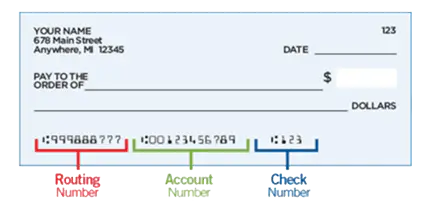
Financial institutions use routing numbers in order to process payments electronically. Some examples of electronic payments that Stanford FCU provides are bill pay, wire transfers, checking transactions (sometimes called electronic checks), and direct deposits.
With Digital Banking, you can access all of these electronic payment methods from your home in a safe and secure environment. Sign up today!
We need a signed Wire Transfer Agreement on file before a domestic or traditional international wire can be processed.
You can review our process for sending and receiving wire transfers to ensure that your wires are successfully sent and received. You can also review our Wire Instructions (the exact information you need to send or receive a wire).
Note: The cutoff time for sending wire transfers is 1:00 PM PT. Transfers made after this time will be scheduled for the next business day.
Watch video tutorial:
You can send your wires through Digital Banking!
Our Digital Banking service provides a secure and trusted way for you to access your accounts anywhere and anytime. Digital Banking lets you manage your accounts and cards, make transfers, pay your bills, deposit checks with your phone and so much more! And the best part? It’s free!
Learn more about the convenient services offered through Digital Banking, or sign up today!
The International Bank Account Number (IBAN) is an international standard of identifying bank accounts. These numbers are used when making or receiving international payments.
The IBAN varies by country/institution and does not replace your account number. Only the institution servicing an account can provide the correct IBAN for that account, and it must be obtained from the person who will receive the wire transfer. An IBAN is required for beneficiary accounts in Europe and other countries around the world.
Learn more about international wire transfers.
Watch video tutorial:
We need a signed Wire Transfer Agreement on file before a domestic or traditional international wire can be processed. Funds transfers provide a potential risk for fraud, as the transfers cannot be reversed.
You can review our process for sending and receiving wire transfers to ensure that your wires are successfully sent and received. You can also review our Wire Instructions (the exact information you need to send or receive a wire).
Note: The cutoff time for sending wire transfers is 1:00 PM PT. Transfers made after this time will be scheduled for the next business day.
Watch video tutorial:
You can review our process for sending and receiving wire transfers to ensure that your wires are successfully sent and received. You can also review our Wire Instructions (the exact information you need to send or receive a wire).
We need a signed Wire Transfer Agreement on file before a domestic or traditional international wire can be processed. Funds transfers provide a potential risk for fraud, as the transfers cannot be reversed.
Note: The cutoff time for sending wire transfers is 1:00 PM PT. Transfers made after this time will be scheduled for the next business day. Credits for incoming wires are posted to member accounts by 3:30 pm PT.
Watch video tutorial:
Our online wire form will provide you with a quote before you complete all the wire information.
You can review our process for sending and receiving wire transfers to ensure that your wires are successfully sent and received. You can also review our Wire Instructions (the exact information you need to send or receive a wire).
Note: The cutoff time for sending wire transfers is 1:00 PM PT. Transfers made after this time will be scheduled for the next business day.
Watch video tutorial:
You might receive a call from our Wire Department as part of the domestic and traditional international wire validation process. All wires and funds transfers provide a high risk for fraud, as the transfers cannot be reversed.
You can review our process for sending and receiving wire transfers to ensure that your wires are successfully sent and received. You can also review our Wire Instructions (the exact information you need to send or receive a wire).
Note: The cutoff time for sending wire transfers is 1:00 PM PT. Transfers made after this time will be scheduled for the next business day.
Watch video tutorial:
There is no card replacement fee to replace lost or stolen debit or credit cards. You can find all of our current Schedule of Fees listed here.
If your card is lost or stolen, you can log in to Digital Banking to order a new card, grab the card info for online purchases, download the digital version to your wallet, and report your card lost or stolen. Don’t use this service if you need rushed delivery, are shipping to an alternate address, or you’re simply replacing a damaged card and want to keep the same card number.
- Log in to Card Center in Digital Banking
- Click on Replace & Order Card
- Follow the steps to submit your request and block your card
- Return to Card Center to add your new card to your digital wallet and grab your card info for online shopping and updating any recurring payments
- If you see suspicious transactions in your account history, visit Dispute Transactions in Card Center to report them to us
You can also block your card and receive a new one by calling 800.234.5354 (domestic) or 303.967.1096 (international collect).
If you simply need a replacement for a damaged card, please contact a Member Care Team Specialist at 888.723.7328or send us a secure Message through Digital Banking to request a new card.
Take control of your cards with Card Tools!
Credit and debit cards are often a source of fraud, as retailers frequently experience data breaches and the card information they store becomes available on the black market. Stanford FCU has strong fraud prevention systems to help protect our members, but we also have tools to help you manage your own cards!
Check out the Card Tools that are available in Digital Banking and take control of your cards today!
Plaid is an online service that instantly links external accounts to your Stanford FCU bank account. Click here to access Plaid in Digital Banking.
Plaid uses an instant authentication, which means you don’t have to wait on microdeposits before linking an external account. To use Instant Auth, sign in with your online credentials for your external account.
Some financial institutions scramble account numbers for security. This means you may not see your actual external account number in Digital Banking.
Your account number can be located:
- Within Digital Banking: Select the account, then click the three dots
 > and select Account Details to view the Account Number
 - On the bottom of your checks:
- Contact our Member Care Team at 888.723.7328, visit any of our branch locations, or send a secure Message in Digital Banking. For security purposes we will not include any account numbers via email.
There are several ways to sign up for direct deposit:
- You can sign up for direct deposit through your employer or through the government agency that issues your checks.
- You can use our Non-Federal Direct Deposit Enrollment Request Form to assist your employer if needed.
- You can also fill out a form provided by your employer or the government agency. You’ll need the following information:
- Stanford FCU’s routing number: 321177722
- Your account number (log in to Digital Banking, click on the three dots at the bottom of the account tile on the home page, and choose Account Details)
- Our address: Stanford Federal Credit Union, P.O. Box 10690, Palo Alto, CA 94303-0843
- Our phone number: 650.723.2509
Note: Your member number is not your account number. Each savings or checking account has a separate, unique account number. You can also find your account number on your checks:
However you sign up for direct deposit, you’ll get your money up to two days before payday, because we always post payroll as soon as we receive your direct deposit!
It’s easy to add or switch your direct deposit to Stanford FCU through your employer or the Social Security Administration. You can also use our Non-Federal Direct Deposit Enrollment Request Form to assist your employer if needed. You’ll need the following information:
- Stanford FCU’s routing number: 321177722
- Your account number (log in to Digital Banking, click on the three dots at the bottom of the account tile on the home page, and choose Account Details)
- Our address: Stanford Federal Credit Union, P.O. Box 10690, Palo Alto, CA 94303-0843
- Our phone number: 650.723.2509
Once your company receives the information or form, the direct deposit switches typically take 1-2 pay cycles.
All of our personal checking (spending) accounts are free, with no minimum balance or other requirements. For up-to-date information on our spending account requirements, visit our Personal Checking Account page.
Our Business Spending account does require a minimum balance to avoid a monthly service fee. For more information on Business Spending, visit our Business Checking account page.
You’ll also find that our account fees(link to Service Fees page) are considerably fewer and lower than the big banks!
Although this is the least secure and slowest way to make a deposit, you can mail a check for deposit to:
Stanford FCU
P.O. Box 10690
Palo Alto, CA 94303-0843
You can also stop by one of our branches, use a shared branch or deposit-taking ATM, or make a deposit with our Digital Banking.
Follow these steps to deposit a check through our Digital Banking:
- Endorse your check by signing the back
- Log into our Digital Banking, and go to Move Money or choose Deposit in the mobile app
- Select the account to deposit into
- Enter the check amount
- Place your check on a plain, dark surface and capture the front, then back
- Submit your deposit
- Follow any additional prompts
Retain the check for 90 days before destroying.
Note: There is a maximum check amount of $50,000.
Although you can order checks from any vendor, we strongly recommend that you order them through Stanford FCU’s preferred vendor. This helps ensure quality and security to ensure there are no issues with your checks. And the first box of checks is free for new members!
If you previously ordered checks through Stanford FCU and your information has not changed, you may reorder checks in Digital Banking.
You can also visit any of our branch locations or call a Member Care Team Specialist at 650.723.2509 or 888.723.7328 toll free.
If you previously ordered checks through Stanford FCU and your information has not changed, you may reorder checks through Digital Banking by clicking here.
If any of your information has changed, you will need to contact us to place your order: Visit any of our branch locations, call a Member Advisor at 888.723.7328, or send a secure Message through Digital Banking.
There is no specific time, but your direct deposit will be posted to your account before 8:00 AM PT on your pay date, and we post the funds as soon as we receive the file from your employer (up to two days before payday!).
You can check your direct deposit and available balance easily through Digital Banking!
Stanford FCU is proud to be a part of the Bank On coalition with our free Everyday Spending account.
Bank On is a national platform for the 501(c)3 corporation Cities for Financial Empowerment (CFE) Fund. Bank On supports financial institutions in providing safe and affordable bank or credit union accounts for everyone.
According to Bank On, nearly 4.5% of U.S. households don’t have a checking or savings account. That’s approximately 5.9 million U.S. adults! Reasons for not having a basic account could include a lack of trust in financial institutions, higher fees, not enough money for the minimum balance, or problems with identification or credit history.
Without a bank or credit union account, many “unbanked” Americans turn to alternative financial services, such as check cashers or pawn shops, often paying exorbitant fees in the process. By choosing not to put money into a stable financial institution with minimal fees, “unbanked” individuals have a harder time building wealth and economic stability. They’re also more likely to be victims of crime, since many keep significant amounts of cash on hand.
In order to prevent this, the CFE Fund and Bank On work with financial institutions to promote and encourage the availability of more low cost or free accounts.
In order to be part of the Bank On coalition, financial institutions must adhere to a set of National Account Standards. These standards are basic requirements to ensure consumers have access to safe and affordable accounts.
Your account balance is the total amount of money that is currently in your account, including any pending transactions (e.g., debit card purchases that have not cleared).
Your available balance is the total amount of money in your account that you can use for purchases and withdrawals, as it excludes pending transactions and check holds from your account balance. However, the available balance will not show checks that haven’t been cashed or deposits which haven’t posted.
You should always use the available balance to determine how much money you have available for purchases and withdrawals. Otherwise you might overdraw your account if you spend based on your account balance and it is higher than your available balance.
There are options available to protect you from an overdrawn account. Learn more about our overdraft protection options.
If you don’t have enough money in your account to cover a check, debit card purchase, recurring debit card or ACH transaction, your financial institution can either reject the transaction or cover it for you. When they cover or protect you from overdrawn accounts, it’s called “overdraft protection”. This can sometimes be embarrassing and expensive because most financial institutions charge a fee. In the case of a bounced check, the check recipient may also charge a fee.
There are three ways to manage transactions when there are insufficient funds:
- Reject the transaction - The financial institution can simply decline the transaction or send back a check you wrote. Note that the check or ACH can be re-submitted, and it will only process when you have enough money in your account. Many financial institutions charge a non-sufficient funds (NSF) fee for rejected items, but Stanford FCU does not.
- Account-to-account transfer - You can link your other accounts at the same financial institution to automatically transfer money into your account to cover a transaction when there isn’t enough money. At Stanford FCU you can set up your savings, money market or credit card to cover checks and ACH items. Most banks charge for these automatic account-to-account transfers (and for cash advance fees if you link to a credit card), but Stanford FCU does not, and never has.
- Courtesy Pay - You can opt into allowing your financial institution to cover transactions when you don’t have enough money, and they will charge a fee for each transaction. At Stanford FCU, Courtesy Pay will cover check, debit card, and ACH transactions. Courtesy Pay is free for transactions under $10, and will cover up to four transactions per day with a Premium OD/Courtesy Pay fee. Our fees are listed on our Schedule of Fees(link to Service Fees page).
Avoid rejected transactions with overdraft protection! Call 888.723.7328 or use Chat to set up account-to-account transfers and opt into Courtesy Pay to protect yourself if your account goes negative.
Stanford FCU does not have Safe Deposit Boxes in our branches
Looking to protect yourself from becoming a victim of fraud? Check out our Fraud Prevention Center for information on online security, resources and tips!
Yes, we highly recommend that you schedule an appointment for notary service at one of our local branches to ensure a notary will be available to assist you. There is no charge for members to use this service. Please bring a photo ID.
Yes. Notary service is available at our branches and we encourage you to make an appointment to ensure a notary is available. There is no charge for members to use this service. Please bring a photo ID.
Not a member yet? Joining is easy! You can open an account with Stanford FCU with as little as $5.00. Open your account today!
We do not have money orders. Members can get a Cashier’s or official check, and there is no fee. You can get a free Cashier’s Check from a local Stanford FCU branch, any shared branch in the U.S., or request one in Digital Banking if the check will be payable to you. If you need a Cashier’s Check made payable to another person, you can send a secure Message through Digital Banking.
There’s no fee for Stop Payments! For security purposes and faster service, we recommend that you complete your Stop Payment requests in Digital Banking:
- Click here to place a Stop Payment of a check or checks
- Click here to place a Stop Payment or Dispute an ACH transaction
After your request has been received and processed, you will receive confirmation through a secure Message in Digital Banking.
There is no fee for a Cashier’s or Official Check for our members! You can request one in Digital Banking if it’s payable to you, stop by one of our branches, call us at 888.723.7328, or send a secure Message through Digital Banking to get your Cashier’s Check today!
An insufficient funds fee (sometimes referred to as a non-sufficient funds fee or NSF fee) can occur when you don’t have enough money in your checking (spending) account to cover the entire transaction. Most financial institutions will reject the transaction and charge a fee. Stanford FCU will reject the transaction, but we won’t charge a fee.
An uncollected funds fee can occur when there are pending credits to your account (like a deposited check that has yet to clear), and you try to make a purchase for more than your available balance. Although there are funds on deposit, a transaction may be declined because the purchase would overdraw the account. Since the check has not cleared, a financial institution cannot guarantee those funds.
As a best practice, always use your available balance as a guide for writing checks, withdrawing cash and making purchases. You can monitor your available balances through Digital Banking.
There are options available to protect you from an overdrawn account. Learn more about our overdraft protection options.
Our mobile check deposit service leads the industry with its patented agile risk management tools and proprietary image technologies to ensure your transaction is secure. For added protection, the images of your checks are not stored on your mobile device. Mobile deposit is much safer than mailing a check, and faster than driving to a branch or ATM to deposit it.
Mobile deposits are subject to verification, and funds may not be available immediately. Once the deposit has been received, you’ll be able to view the pending transaction through Digital Banking. In most cases, checks will be deposited the same day.
You can also request a Check Hold Release through Digital Banking. Click here.
Ready to make a mobile deposit? It’s easy!
Follow these steps to deposit a check:
- Endorse your check by signing the back
- Log in to the mobile app and select Deposit from the very bottom
- Select the account to deposit into
- Enter the check amount
- Place your check on a plain, dark surface and capture the front, then back
- Submit your deposit
- Follow any additional prompts
Retain the check for 90 days before destroying.
Please note: There is a maximum check amount of $50,000.
Depositing checks with your smartphone or tablet is easy with Stanford FCU’s convenient mobile app!
Follow these steps to deposit a check:
- Endorse your check by signing the back
- Log in to Digital Banking, and select Deposit from the quick links at the bottom
- Select the account to deposit into
- Enter the check amount
- Place your check on a plain, dark surface and capture the front, then back
- Submit your deposit
- Follow any additional prompts
- Retain the check for 90 days before destroying.
Note: There is a maximum check amount of $50,000.
The following types of checks are accepted with mobile check deposit:
- Personal checks
- Business checks
- Government/Treasury checks
- Cashier’s checks
Note: The check must be from a United States financial institution and in United States currency.