Move Money

CashBack+ is our free rewards program that puts money back in your pocket—just for shopping at brands you already love and paying a little differently.

We need a signed Wire Transfer Agreement on file before a domestic or traditional international wire can be processed.
You can review our process for sending and receiving wire transfers to ensure that your wires are successfully sent and received. You can also review our Wire Instructions (the exact information you need to send or receive a wire).
Note: The cutoff time for sending wire transfers is 1:00 PM PT. Transfers made after this time will be scheduled for the next business day.
Watch video tutorial:
You can send your wires through Digital Banking!
Our Digital Banking service provides a secure and trusted way for you to access your accounts anywhere and anytime. Digital Banking lets you manage your accounts and cards, make transfers, pay your bills, deposit checks with your phone and so much more! And the best part? It’s free!
Learn more about the convenient services offered through Digital Banking, or sign up today!
The International Bank Account Number (IBAN) is an international standard of identifying bank accounts. These numbers are used when making or receiving international payments.
The IBAN varies by country/institution and does not replace your account number. Only the institution servicing an account can provide the correct IBAN for that account, and it must be obtained from the person who will receive the wire transfer. An IBAN is required for beneficiary accounts in Europe and other countries around the world.
Learn more about international wire transfers.
Watch video tutorial:
We need a signed Wire Transfer Agreement on file before a domestic or traditional international wire can be processed. Funds transfers provide a potential risk for fraud, as the transfers cannot be reversed.
You can review our process for sending and receiving wire transfers to ensure that your wires are successfully sent and received. You can also review our Wire Instructions (the exact information you need to send or receive a wire).
Note: The cutoff time for sending wire transfers is 1:00 PM PT. Transfers made after this time will be scheduled for the next business day.
Watch video tutorial:
You can review our process for sending and receiving wire transfers to ensure that your wires are successfully sent and received. You can also review our Wire Instructions (the exact information you need to send or receive a wire).
We need a signed Wire Transfer Agreement on file before a domestic or traditional international wire can be processed. Funds transfers provide a potential risk for fraud, as the transfers cannot be reversed.
Note: The cutoff time for sending wire transfers is 1:00 PM PT. Transfers made after this time will be scheduled for the next business day. Credits for incoming wires are posted to member accounts by 3:30 pm PT.
Watch video tutorial:
Our online wire form will provide you with a quote before you complete all the wire information.
You can review our process for sending and receiving wire transfers to ensure that your wires are successfully sent and received. You can also review our Wire Instructions (the exact information you need to send or receive a wire).
Note: The cutoff time for sending wire transfers is 1:00 PM PT. Transfers made after this time will be scheduled for the next business day.
Watch video tutorial:
You might receive a call from our Wire Department as part of the domestic and traditional international wire validation process. All wires and funds transfers provide a high risk for fraud, as the transfers cannot be reversed.
You can review our process for sending and receiving wire transfers to ensure that your wires are successfully sent and received. You can also review our Wire Instructions (the exact information you need to send or receive a wire).
Note: The cutoff time for sending wire transfers is 1:00 PM PT. Transfers made after this time will be scheduled for the next business day.
Watch video tutorial:
There is no fee for incoming wires. Check our Fee Schedule for domestic and traditional international outgoing wire fees. If you have a Student Spending Account or Ambassador level Loyalty+ relationship, these fees are waived.
You can review our process for sending and receiving wire transfers to ensure that your wires are successfully sent and received. You can also review our Wire Instructions (the exact information you need to send or receive a wire).
Note: The cutoff time for sending wire transfers is 1:00 PM PT. Transfers made after this time will be scheduled for the next business day.
Watch video tutorial:
You can transfer funds between your Stanford FCU accounts, to another Stanford FCU member (if you know the account number), or to and from your accounts at another financial institution. If you want to send money to someone who is not a Stanford FCU member, you can use Zelle® or send a Wire Transfer.
- Click here to transfer funds between your Stanford FCU accounts
- Click here to transfer funds to another member
- Click here to transfer funds to and from your accounts at another financial institution
- From there you can connect your external account instantly through Plaid
- Once the external account is established, it will always appear under the normal Transfer Funds service as an option to transfer to or from
You can set up recurring or future dated transfers through Digital Banking by clicking here.
- For a recurring transfer use the Frequency drop-down menu to choose when you want the transfer to occur
- To make a future dated transfer select the date from the calendar
You can transfer Member to Member within Digital Banking, and the Link Account feature allows you to make recurring or future-dated transfers to another Stanford FCU member’s account instead of just once. No information other than the deposit is shared when you use this feature.
Yes, you can transfer funds to another Stanford FCU member through Digital Banking with a Member to Member Transfer. You’ll need the other member’s Account Number, Account Type (e.g., checking or savings) and email address to ensure the funds go to the right account. Select either Single Transfer for a one-time transaction or Link Account for continuous and future transactions.
The transfer will be immediate.
You can edit or delete your External Accounts in Digital Banking by going to Profile & Settings > Manage Account Preferences then scroll down and click on the account to open your edit options. You can edit Recurring Transactions through the Transaction Activity Center. Then choose the Recurring Transactions tab, to edit the series.
Our daily cut-off time for processing External Transfers to and from another financial institution is 1:00 pm PT.
If you made your transfer request before the cut-off time, your request will be scheduled for the following business day.
If you made your request after the cut-off time, your request will be scheduled on the second business day.
Scheduled and Recurring Transfers are processed on their send date.
The other financial institution may take an additional business day to process.
Digital Banking transfers between your own accounts and other Stanford FCU member accounts are immediate. Transfers to and from your accounts at other financial institutions may take several days. If you have questions about transfers, please send us a secure Message through Digital Banking, or call 888.723.7328.
Of course! Stanford FCU offers several convenient methods to make your loan payments:
- Pay online through Digital Banking
- Set up automated transfers from a Stanford FCU checking (spending) account through Digital Banking
- Mail-in Payments
- Stanford Federal Credit Union
PO Box 10690
Palo Alto, CA 94303-0843
- Stanford Federal Credit Union
- Pay Over the Phone by contacting a Member Care Team Specialist at 650.723.2509 (local) or 888.723.7328 toll free, Option 0.
If you want to make a loan payment at another financial institution, click here.
The services available in Bill Pay include:
- Set up payees once to easily make payments
- Schedule automatic monthly payments for recurring bills
- View payment history for each payee
- Receive notifications about bills and payments
- Pay bills from your Stanford FCU checking (spending) account
- Pay the balance in full, instead of the minimum payment due
- Make a partial payment (e.g., an extra mortgage payment)
- Payee’s account number required
- Download or export payment data
- Receive and pay eBills
It’s easy to get started:
- Log in to Digital Banking
- Choose Move Money
- Select Bill Pay
- Complete a few more easy steps and you’re enrolled!
You can pay any bill through Digital Banking’s free Bill Pay service:
- Log in to Digital Banking
- Select Move Money
- Click Bill Pay
- Follow the prompts
You may also schedule payments to other financial institutions by establishing an external transfer. Learn how to set up an external account.
Automated Clearing House (ACH) payments are electronic payments made from one bank account to another. You will need to set up the ACH payment with your other financial institution by providing Stanford FCU’s routing number (#321177722) and your account number.
You can also use our Bill Pay to send payments by check or electronically, if available.
Need your account number?
- Your account number can be located:
- On your statements
- Within Digital Banking (select the account, then click the three dots
 > and select Account Details to view the Account Number)
 - On the bottom of your checks:
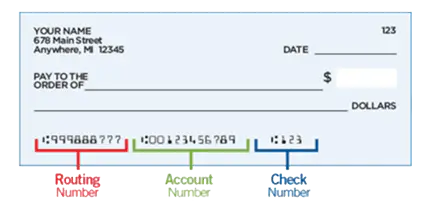
- Contact one of our Member Advisors at 888.723.7328, visit any of our branch locations, or send a secure Message in Digital Banking. For security purposes we will not include any account numbers via email.
You can get a free Cashier’s Check from a local Stanford FCU branch, any shared branch in the U.S., or request one through Digital Banking (if the check will be payable to you). You’ll receive an email confirmation after your request is received, and you should receive your check within 7 to 10 business days.
If you need a Cashier’s Check made payable to another person, you can use Chat or send a secure Message through Digital Banking.
Depositing checks with your smartphone or tablet is easy with Stanford FCU’s convenient mobile app!
Follow these steps to deposit a check:
- Endorse your check by signing the back
- Log in to Digital Banking, and select Deposit from the quick links at the bottom
- Select the account to deposit into
- Enter the check amount
- Place your check on a plain, dark surface and capture the front, then back
- Submit your deposit
- Follow any additional prompts
- Retain the check for 90 days before destroying.
Note: There is a maximum check amount of $50,000.