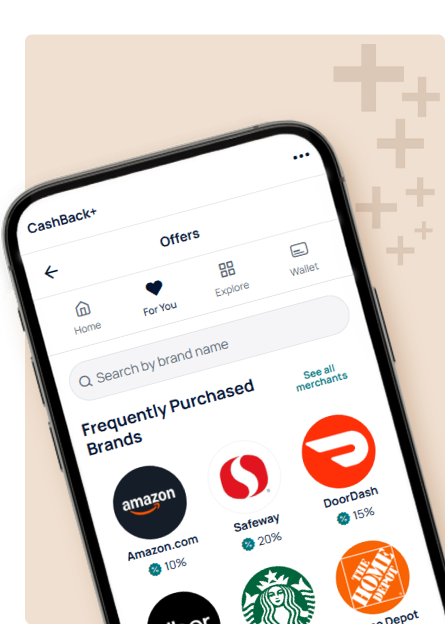
CashBack+ 

Everyday spending just got more rewarding!
Earn instant cashback wherever you pay, online or in-store
Earn up to 20% cashback without a credit card
Special offers from your favorite brands for customized cashback
Easy access to your rewards when you’re ready to use them
Let's put a number on it

Stanford FCU members have already earned over $600,000 (and counting) in cashback rewards since we launched in 2023.

Three simple ways to earn cashback

CashBack+ is our free rewards program that puts money back in your pocket—just for shopping at brands you already love and banking the way you normally do. Every dollar you earn across all three methods goes into one combined cashback balance in your Digital Banking account—so it’s easy to track and use. 

Pay with the CashBack+ Pay App

The CashBack+ Pay app makes earning extra cash easy and unlocks our highest cashback offers. When you’re ready to pay, in‑store or online, the app creates a digital gift card for the exact amount you need, right then and there. You pay instantly—no planning ahead, no guesswork, no hassle.

  • Score higher cashback than what you’ll find in Digital Banking
  • Pay for exactly what’s in your cart, right when you need it (no planning ahead)
  • Use it anywhere you’re checking out—online or in-store
  • Links directly to your Stanford FCU account for seamless payments

Get CashBack+ Pay

Download the CashBack+ Pay app for iPhone or Android to start earning instant cashback. Prefer shopping on a desktop? Use the Chrome extension for online purchases.

Buy digital gift cards in Digital Banking

Browse hundreds of popular brands right in Digital Banking and earn instant cashback when you buy a digital gift card.

  • Shop favorites like Amazon, Target, Starbucks, and hundreds more
  • Get cashback added to your balance as soon as you purchase
  • Use your gift card online or in-store
Earn for everyday banking activities

Get rewarded for things you’re already doing as a Stanford FCU member like setting up direct deposit, using your debit card for purchase or other qualifying activities.

Cashback adds up automatically and is credited to your balance monthly. Actions may vary by member and won’t always be available, so check the actions tab in CashBack+ to see what’s up for grabs.

Here's how to use your cashback

All the cashback you earn—from gift cards, banking activities and the CashBack+ Pay app—hangs out in one spot in Digital Banking. Ready to use it? Simply transfer it to your Stanford FCU spending or savings account and spend it however you like. Or, redeem it for another gift card to stack even more cashback on top.


Make purchases and utilize funds anywhere with Stanford Federal Credit Union's debit and gift cards. Contact us or visit a Bay Area CA branch to become a member.

What fantastic deals are waiting for you today?

Our members and their stories matter most.

Frequently asked questions

CashBack+ is a rewards benefit offered in Digital Banking. Earn instant cashback by completing actions and by doing your everyday shopping with digital gift cards.

It’s an experience that’s designed to reward engagement with us. Membership pays!

You can earn cashback rewards by purchasing digital gift cards to pay for your orders in-store and online. You can also earn by completing reward actions offered periodically in Digital Banking.

You can always see your cashback balance at the top of the CashBack+ homepage in Digital Banking. When you’re ready to use it, you can transfer your cashback to your Stanford FCU spending or savings account with no minimums, or redeem it for another gift card to stack even more cashback.

Cashback is earned instantly, and there are no limits on how much you can earn.

You can access CashBack+ through Digital Banking. If you’re not yet signed up for Digital Banking, you’ll need to do that first.

Yes. CashBack+ is included with your Stanford FCU membership at no cost.

No, you can earn cashback through Digital Banking without the app. But the CashBack+ Pay app gives you higher cashback rates and makes it much easier to pay in-store and online, so it’s worth downloading. You can also use the Chrome browser extension on desktop to earn cashback when shopping online.

Linking your Stanford FCU account is easy. When you open the CashBack+ Pay app for the first time, it guides you through a secure setup to connect your account. For security, you’ll need to relink every 30 days.

CashBack+ actions allow you to earn cashback by completing specific tasks set by your credit union. To earn cashback, activate the action and complete the required task. Once verified, the cashback will be credited to your account balance.

You can go to the Actions tab within CashBack+ to view and activate any available actions, and click on ‘View details’ on the action to learn more about how to complete the action and track your progress. You should check your actions monthly, although we may add actions more frequently. Not all members will always have available actions to complete. Don’t forget to look at the expiration date when you activate an action.

Once the actions are completed and approved, your cashback will be added to your cashback balance monthly. You may see “payout processing” which means you completed your actions and are awaiting the cashback to be added to your balance in the next payout cycle.

Cashback from gift cards purchased through Digital Banking or CashBack+ Pay is added to your account instantly. When you’re ready to use it, you can transfer your cashback directly to your Stanford FCU spending or savings account, or redeem it for another gift card to stack even more cashback.

Your CashBack+ digital gift cards are available in your CashBack+ wallet within Digital Banking, and they never expire! You’ll also receive an email confirmation with instructions and a PIN to redeem your gift card yourself or forward to a friend.

You can also follow these steps to view and redeem your gift cards and balances. Once you start using a gift card, you’ll need to check with the merchant on the remaining balance. Visit CashBack+ in Digital Banking, then select the Wallet icon at the top to see your gift cards. For online purchases, enter the Gift Card Code. For in-store purchases, use the QR code.

You can find your cashback balance at the top of the CashBack+ homepage. When you’re ready to use it, transfer it to your Stanford FCU spending or savings account, or redeem it for another gift card to stack even more cashback.

Questions? Please email CashBack+ directly at [email protected].

Unlock rewards, bonus rates, cashback and more!

Get more from us by doing more with us...it all starts with a free checking (spending) account.