FAQs

Monday – Friday: 9 AM – 5 PM PT
Saturday: 10 AM – 3 PM PT
Sunday: Closed
Schedule a call or Zoom meeting with a Member Advisor.
If you're a member, contact us through Digital Banking.
And here's a great place to start.
Manage Accounts
Please click here for our fillable Trustee’s Account Agreement form, or Trust Agreement form.
A trust is an estate-planning tool used primarily to avoid the delays and costs of the probate process, which is what happens when someone passes away with only a will or no will.
Choosing and creating a trust can be a complex process; the guidance of an attorney with estate planning expertise is highly recommended.
Types of Stanford FCU Trusts
- Revocable - at least one Trustor of the Trust must be a member of Stanford FCU
- Irrevocable - either all of the Trustors or all of the Beneficiaries of the Trust must be members of Stanford FCU
Upon creating the agreement, the member transfers title to his Stanford FCU assets to be held in trust.
A trust is an estate-planning tool used primarily to avoid the delays and costs of the probate process, which is what happens when someone passes away with only a will or no will.
Choosing and creating a trust can be a complex process; the guidance of an attorney with estate planning expertise is highly recommended.
Types of Stanford FCU Trusts
- Revocable - at least one Trustor of the Trust must be a member of Stanford FCU
- Irrevocable - either all of the Trustors or all of the Beneficiaries of the Trust must be members of Stanford FCU
Upon creating the agreement, the member transfers title to their Stanford FCU assets to be held in trust.
If you’ve created a trust agreement and would like to transfer title of your credit union assets to be held in trust, you will need to complete a Trust Agreement.
If you’re not yet a member and need to establish an account that you would like held in trust, you will need to become a member and complete a Trust Agreement.
Questions? Contact our Member Care Team at 888.723.7328 or schedule an appointment at a local branch.
You’ll need to contact us by calling 888.723.7328, using Chat during business hours, or sending us a secure Message through Digital Banking.
Haven’t signed up for Digital Banking yet?
You can view your account history, transfer funds between your accounts, make a loan payment, access Bill Pay and eStatements…and more!
Sign up for Digital Banking today to handle all your personal banking in one convenient and secure place.
You can close a checking (spending), savings or money market account in Digital Banking and direct us on what to do with the remaining account balance: Either transfer the balance to another Stanford FCU account where you’re the primary or joint owner, or have a Cashier’s Check mailed to you. Click here to close an account in Digital Banking.
You may close a Certificate on the maturity date or during the 7-day grace period that follows it.
Alternatively, you may close your account by calling 888.723.7328, sending a secure Message in Digital Banking, or visiting a local Stanford FCU branch.
Your account number can be located:
- Within Digital Banking: Select the account, then click the three dots
 > and select Account Details to view the Account Number
 - On the bottom of your checks:
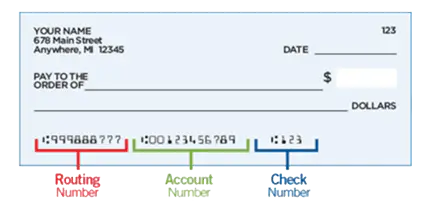
- Contact our Member Care Team at 888.723.7328, visit any of our branch locations, or send a secure Message in Digital Banking. For security purposes we will not include any account numbers via email.
Before you close your Stanford FCU account, please note that you’re a member for life, and we have hundreds of members doing business with us around the world! Our Visa debit and credit cards are international, with no foreign transaction fees. Let us know how we can serve you!
If you absolutely must close your account (and we hate to see you go), there are three options:
- Close your account in Digital Banking
- Sign a written request and mail it to Stanford FCU, c/o Account Closure, P.O. Box 10690, Palo Alto, CA 94303-0843
- Visit a local Stanford FCU branch
Members also have access to 6,000 Co-op shared branches at other credit unions, where you can conduct transactions on your Stanford FCU accounts.
You can check your account balances and transactions 24/7 by logging in to Digital Banking. Learn more about Digital Banking on our website.
A canceled check is a check which has cleared the depositor’s account, and therefore marked “canceled” by the depositor’s financial institution. Copies of canceled checks can be used as proof of payment and are accessible for up to 7 years.
You can get a copy of a cleared check online. Just log into Digital Banking and search for the transaction in your transaction history. When you click on the check number, you should be able to view and print a copy of the cleared check.
Please note: You can view the past 18 months’ worth of transactions in Digital Banking. If you need a check copy prior to this time frame or a range of checks, you can use our Research Request option in Digital Banking.
Yes! You can open a savings or checking (spending) account without leaving the comfort of your home. Review our savings and checking account options first. Current members can open accounts through Digital Banking. Non-members can also join and open an account online.
You can also become a member by opening a Savings or Money Market Account.
Plaid is an online service that instantly links external accounts to your Stanford FCU bank account. Click here to access Plaid in Digital Banking.
There are two ways to link accounts:
- Instant Auth. Plaid uses an instant authentication, which means you don’t have to wait on microdeposits before linking an external account. To use Instant Auth, sign in with your online credentials for your external account.
- Microdeposits. If your external institution isn’t connected to Plaid, you can still use Plaid to link your accounts via Microdeposits. This will take 1-2 business days. To complete this process, you will need your account and routing numbers.
Some financial institutions scramble account numbers for security. This means you may not see your actual external account number in Digital Banking.
If you already have a beneficiary on file, you’ll see the beneficiary name appear under Add As Beneficiary on the Account when you open a new deposit account in Digital Banking. Simply check the box next to the beneficiary name you wish to add to the new account.
You can also add and delete new beneficiaries through the Manage Beneficiaries tool in Digital Banking, use authenticated Chat through Digital Banking, call us at 888.723.7328, or schedule an appointment at our Virtual Branch.